
WhatsApp CRM for Sales Teams in India (2026): Manage Leads, Follow-Ups & Customer Conversations
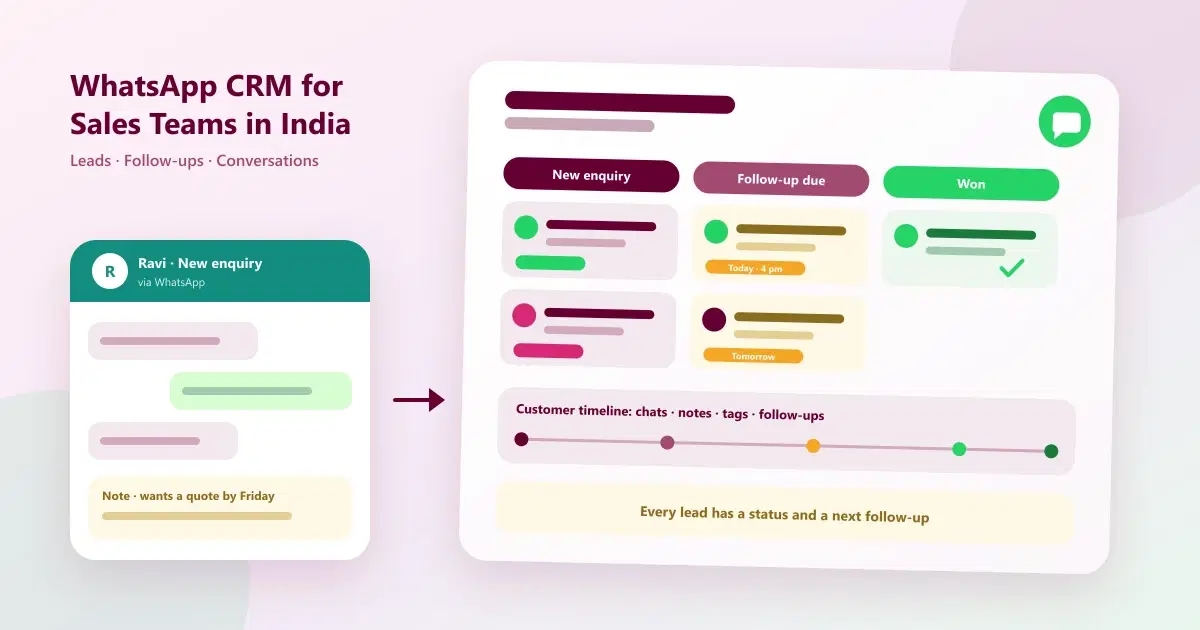
WhatsApp CRM for sales teams in India: capture leads, track follow-ups and keep conversation history in one place, and see how it differs from a sales CRM.
For many Indian businesses, the sale does not happen in a CRM. It happens in a WhatsApp chat. A customer messages to ask the price, the salesperson replies, the customer goes quiet, and a week later nobody remembers what was promised. Meanwhile the "CRM" is a spreadsheet that is two weeks out of date.
A WhatsApp CRM for sales teams fixes this by putting leads, conversations and follow-ups in one place, built around the channel your customers already use. This guide explains what a WhatsApp Sales CRM is, how it differs from a traditional sales CRM, how to capture leads and track follow-ups, and what to evaluate before you choose. It also answers a question we hear often: is Cleomitra a sales CRM?
Quick Answer: What Is a WhatsApp CRM for Sales Teams?
A WhatsApp CRM for sales teams is customer relationship software built around WhatsApp. It captures leads from conversations, stores customer history, tracks follow-ups with reminders, lets several salespeople work from one number, and runs targeted campaigns, so no enquiry is forgotten and every follow-up happens on time.
What Is a WhatsApp Sales CRM?
A WhatsApp Sales CRM in India is a CRM where the WhatsApp conversation is the centre of the sales process, not an add-on. Each lead is a customer record linked to their chats, notes, tags and follow-up tasks. When a customer messages, your team sees who they are, what they asked before, and what happens next.
There are two common designs, and the difference matters:
- Sales CRM with WhatsApp integration: a traditional sales CRM, built around deals and pipelines, with WhatsApp added through an integration or plugin. WhatsApp is one of several channels.
- WhatsApp-led CRM: a CRM designed around WhatsApp first, with the shared inbox, customer records, follow-ups and campaigns built to work together.
Neither is better in every case. Which one fits depends on how your team sells, as the next section shows. For background, see what WhatsApp CRM is and how WhatsApp CRM works.
WhatsApp CRM vs Traditional Sales CRM
| Factor | WhatsApp-led CRM | Traditional sales CRM |
|---|---|---|
| Centre of the system | The customer conversation | The deal and pipeline stage |
| Where leads usually come from | WhatsApp, Instagram, calls and walk-ins | Forms, email, ads and outbound prospecting |
| Follow-up channel | WhatsApp first | Email and phone first, WhatsApp via integration |
| Typical sales cycle | Short, with quick decisions | Often longer, with several stakeholders |
| Depth of deal management | Lead status, tags and follow-up tasks | Detailed stages, forecasting and reporting |
| Team setup | Shared inbox for several people on one number | Individual rep accounts and quotas |
| Best for | Businesses that sell through chat | Teams running structured, longer B2B deals |
If you want a vendor comparison of traditional options, see Top 10 Sales CRM Software in India or our sales CRM comparison page. This guide is about the WhatsApp-led approach, and if you are choosing among WhatsApp tools specifically, start with our top 10 WhatsApp CRM software in India.
How Businesses Capture and Manage Leads on WhatsApp
WhatsApp lead management software starts with capture. Leads reach a business in many ways, and the CRM should bring them into one place:
- Click-to-chat links and QR codes on your website, ads, posters and packaging.
- Instagram DMs from people who saw a post or reel.
- Phone calls, including missed calls that need a callback.
- Walk-ins and referrals, added by staff at the desk.
- Existing customers who message for something new.
Once captured, each lead needs a record and a status. A simple lead flow looks like this:
| Stage | What it means | Next action |
|---|---|---|
| New enquiry | First message received | Reply, and capture name, need and source |
| Contacted | You have replied and asked questions | Understand budget, timing and requirement |
| Interested | Customer wants details or a quote | Send details and set a follow-up date |
| Decision pending | Customer is considering | Follow up on schedule |
| Won or lost | Customer bought, or declined | Thank, or record the reason and move to a later list |
For a method to organise contacts and tags, read how to organize WhatsApp customers, and for common problems, top 10 problems managing leads on WhatsApp.
How Sales Teams Track Follow-Ups
Most lost sales are not lost to a competitor. They are lost to a forgotten follow-up. A WhatsApp CRM for lead follow-ups keeps them from slipping by turning each promise into a task.
- Set the next step on every lead. A lead with no next date is a lead that will be forgotten.
- Use reminders. The CRM should remind the owner when a follow-up is due.
- Separate pending, done and missed. A follow-up view shows what is due today and what has slipped.
- Follow a simple cadence. For example, the same day with the requested details, a day or two later with a helpful nudge, and once more before the offer ends. Then stop.
- Make replying easy. End messages with one clear action, such as "Reply YES and we will hold it for you".
Our guide to why leads don't convert into customers explains what happens when this discipline is missing.
How Conversation History Helps Sales Teams
A sales conversation rarely stays with one person. A colleague covers a day off, a manager steps in on a big enquiry, or the customer returns a month later. Without history, each handover starts from zero. With a CRM, the history helps in four ways:
- No repeated questions. The next person sees what the customer already said.
- Smoother handovers. Notes and tags explain where the lead stands.
- Better personalisation. Past purchases and preferences shape the next message.
- Manager visibility. Managers can review conversations and coach the team, within the access you set.
This is the same idea behind the shared inbox, explained in the benefits of a WhatsApp shared inbox.
WhatsApp Coexistence and Your Existing Number
Many sales teams already run on one WhatsApp Business number that customers know. Changing it would mean losing trust and contacts. WhatsApp Coexistence lets eligible businesses keep their number and keep using the WhatsApp Business app while the same number is also connected to a CRM platform.
It is worth being precise about what changes. According to Meta's documentation, broadcast lists are disabled in the Business app once the number is connected, and campaigns are sent through the platform instead. Disappearing and view-once messages are turned off for individual chats, and eligibility depends on your number, app version and provider. We explain this in detail in WhatsApp CRM for small businesses in India and WhatsApp Coexistence explained.
Automation and Campaigns for Customer Engagement
Automation and campaigns do not replace salespeople. They remove the repetitive work so salespeople can spend time on real conversations.
- Instant replies and after-hours messages so no enquiry waits unacknowledged.
- Answers to common questions about price, timing and availability, with an easy path to a person.
- Automated follow-ups for leads who have not replied.
- Targeted campaigns to customer groups, such as past buyers or leads interested in a specific product, sent only to opted-in customers using approved templates.
- Post-sale messages such as thanks, feedback requests and repeat-purchase reminders.
Business-initiated messages outside the 24-hour customer service window generally need an approved template, and Meta charges for template messages separately from your software. See WhatsApp tasks to automate and WhatsApp CRM strategies for festive sales for ideas.
Industries That Benefit From WhatsApp-Led Sales Management
| Industry | Typical use of WhatsApp for sales | Note |
|---|---|---|
| Real estate | Enquiry follow-up, site-visit scheduling, sharing project details | Long cycles need consistent follow-up |
| Education and training | Admission enquiries, demo and batch reminders | Parents and students prefer chat |
| Retail and showrooms | Product enquiries, offers, repeat-purchase reminders | Segment customers by purchase |
| Salons, spas and clinics | Booking enquiries, reminders, rebooking | Fast replies decide the booking |
| Local and professional services | Quotes, scheduling, follow-ups | Customer history helps repeat work |
| Direct-to-consumer brands | Product questions, offers, back-in-stock messages | High-volume catalogue and order tooling may need specialist tools |
For a worked example in real estate, see our guide to CRM for real estate agents in Dubai, and for salons, salon customer retention.
8 Features to Evaluate Before Choosing a Sales CRM With WhatsApp
Whether you pick a sales CRM with WhatsApp integration or a WhatsApp-led CRM, check these eight things. They are also good questions to ask any vendor, and they apply to CRM software for managing WhatsApp enquiries.
1. Official WhatsApp Business Platform access
Confirm that the tool uses the official WhatsApp Business Platform, not unofficial methods that put your number at risk.
2. Existing number support
Ask whether you can keep your current number, whether Coexistence is supported, and exactly which app features change.
3. Shared team inbox
Several salespeople should be able to work from one number with their own access, alerts and role-based permissions.
4. Lead and customer records
Look for profiles that hold conversation history, notes, tags and activity, and for a way to import your existing contacts.
5. Follow-up tracking and reminders
You need tasks and reminders tied to each lead, with a view of what is due, done and missed.
6. Automation and campaigns
Check for automated replies and follow-ups, customer groups for targeting, template management, and opt-in handling.
7. Reporting
Ask what you can measure: messages, responses, follow-ups and conversions. If you need sales forecasting or detailed pipeline analytics, check that explicitly.
8. Fit, pricing and support
Compare the subscription in rupees, Meta's separate message charges, user and customer limits, and the setup help you will get. Make sure the tool matches how your team actually sells.
Sales Metrics to Track
- First response time: how long a new enquiry waits.
- Enquiry-to-sale rate: sales divided by enquiries received.
- Follow-up completion rate: follow-ups done on time divided by follow-ups due.
- Leads by source: which channel brings the best enquiries.
- Campaign replies and conversions: whether your messages lead to sales.
For formulas, see WhatsApp marketing metrics.
Is Cleomitra a Sales CRM?
This is the question we hear most, so here is a direct answer. Yes. Cleomitra can serve as a sales CRM for businesses whose sales process is driven by WhatsApp conversations, customer enquiries and follow-ups.
Teams can organise customer records, review conversation history, use tags and notes, manage customer enquiries and track follow-up tasks. Cleomitra also captures leads from WhatsApp, Instagram, calls and email, runs campaigns, and, for service businesses, turns chats into bookings and invoices.
Businesses that need advanced B2B sales forecasting, territory management or complex opportunity management should evaluate those specific requirements before choosing a CRM. Cleomitra's primary strength is WhatsApp-led sales and customer engagement. If your sales are mostly long, multi-stakeholder deals, a dedicated sales CRM may fit better, with WhatsApp added through an integration. If most of your leads and follow-ups already happen on WhatsApp, a WhatsApp-led CRM is closer to how your team really sells.
How Cleomitra Brings WhatsApp Communication and CRM Together
Based on what the product offers:
- Shared inbox: all customer messages are captured in one team inbox, with instant alerts and smart routing, customer history, tags and internal notes. See the WhatsApp platform page.
- Lead channels: capture leads from WhatsApp, Instagram DMs, calls (with missed-call alerts) and email in one place.
- Contacts and follow-ups: import contacts in bulk, apply tags, view complete customer profiles with history, notes and conversations, and use a follow-up manager with automated reminders. See the Contacts and Follow-ups page.
- Automation and campaigns: run targeted campaigns for specific lead groups and automate follow-ups, subject to WhatsApp and Meta policies and messaging limits.
- Coexistence: for eligible businesses, keep your existing number and contacts. See the WhatsApp Coexistence page. Broadcast lists move to the platform, as explained above.
- Reports: review metrics such as messages sent, responses, booking conversions and campaign performance.
- Bookings and billing: for service businesses, appointments, POS with GST invoices and more through Service OS.
Plan details, based on the current Cleomitra pricing:
- Engage Starter (₹999/month) includes a basic shared inbox, manual campaigns and one ready-made Autopilot flow, but no CRM.
- Engage Growth (₹1,499/month) adds the CRM with the shared inbox, an unlimited flow builder, scheduled and recurring campaigns, and reports and insights.
- Engage Pro (₹2,499/month) adds unlimited pipelines and flows, and includes Instagram and email.
- Service OS Growth (₹2,799/month) and Service OS Pro (₹3,999/month) add appointments and booking, billing and more for service businesses.
Meta's WhatsApp message charges are separate from the subscription. Check the pricing page for exactly what each plan includes, and see how Cleomitra compares in our top 10 WhatsApp CRM software in India.
Common Mistakes to Avoid
- Choosing a CRM that doesn't match how you sell. A chat-led business and a long B2B cycle need different tools.
- No next step on a lead. Every active lead needs a follow-up date.
- Keeping leads on personal phones. They leave when the person leaves.
- Messaging without opt-in. It risks blocks and a poor quality rating.
- Assuming every app feature continues with Coexistence. Check what changes.
- Over-automating. Customers should be able to reach a person.
- Not measuring. Track response time, follow-ups and conversion.
Related Guides
- Top 10 WhatsApp CRM Software in India (2026): Pricing
- Top 10 Sales CRM Software in India
- What Is WhatsApp CRM?
- How Does WhatsApp CRM Work? From First Message to Repeat Customer
- WhatsApp CRM for Small Businesses in India (2026): Keep Your Number, Scale Campaigns
- Top 10 Problems Managing Leads on WhatsApp
Ready to Manage Leads and Follow-Ups on WhatsApp?
See how Cleomitra can bring your WhatsApp conversations, leads and follow-ups into one platform.
Frequently Asked Questions
What is a WhatsApp CRM for sales teams?
A WhatsApp CRM for sales teams is customer relationship software built around WhatsApp. It captures leads from conversations, stores customer history, tracks follow-ups with reminders, lets several salespeople work from one number, and runs targeted campaigns, so enquiries are not forgotten and follow-ups happen on time.
What is the difference between a WhatsApp CRM and a sales CRM?
A WhatsApp CRM is built around the customer conversation and suits businesses that sell through chat. A traditional sales CRM is built around deals, pipeline stages and forecasting, and suits structured, longer B2B sales. Many businesses choose based on where their leads and follow-ups actually happen.
Is Cleomitra a sales CRM?
Yes, for businesses whose sales are driven by WhatsApp conversations, enquiries and follow-ups. Teams can organise customer records, review conversation history, use tags and notes, and track follow-up tasks. For advanced B2B forecasting, territory management or complex opportunity management, evaluate those requirements first. Cleomitra's primary strength is WhatsApp-led sales and customer engagement.
How does WhatsApp lead management software help me manage leads?
Bring every enquiry into one place, record the name, need and source, and give each lead a status and a next follow-up date. Use tags and notes for context, reminders for follow-ups, and a shared inbox so any salesperson can continue the conversation. Review pending and missed follow-ups every day.
Can a sales team use WhatsApp CRM with an existing number?
Often yes. WhatsApp Coexistence lets eligible businesses keep their number and the WhatsApp Business app while connecting to a CRM. Eligibility depends on Meta's rules and your provider, and some app features change, such as broadcast lists moving to the platform. Confirm the details before connecting.
What features should I look for in a sales CRM with WhatsApp integration?
Look for official WhatsApp Business Platform access, support for your existing number, a shared team inbox, lead records with history, follow-up reminders, automation and campaigns with opt-in handling, and reporting. Also compare rupee pricing, Meta's separate message charges, limits, and whether the tool matches how your team sells.
Is a WhatsApp CRM suitable for B2B sales?
It can be, especially for short or relationship-led B2B sales where quotes and follow-ups happen on WhatsApp. For long, multi-stakeholder deals that need forecasting and detailed pipeline stages, a dedicated sales CRM is usually stronger, with WhatsApp added through an integration. Choose based on your sales process.
How much does a WhatsApp CRM cost in India?
There are two parts: the platform subscription, usually priced in rupees per month, and Meta's WhatsApp message charges, which are separate and can change. At Cleomitra, plans start at ₹999 per month, and the CRM with the shared inbox starts at ₹1,499. Compare what each plan includes first.
