
Top 10 Benefits of a WhatsApp Shared Inbox for Growing Businesses (2026)
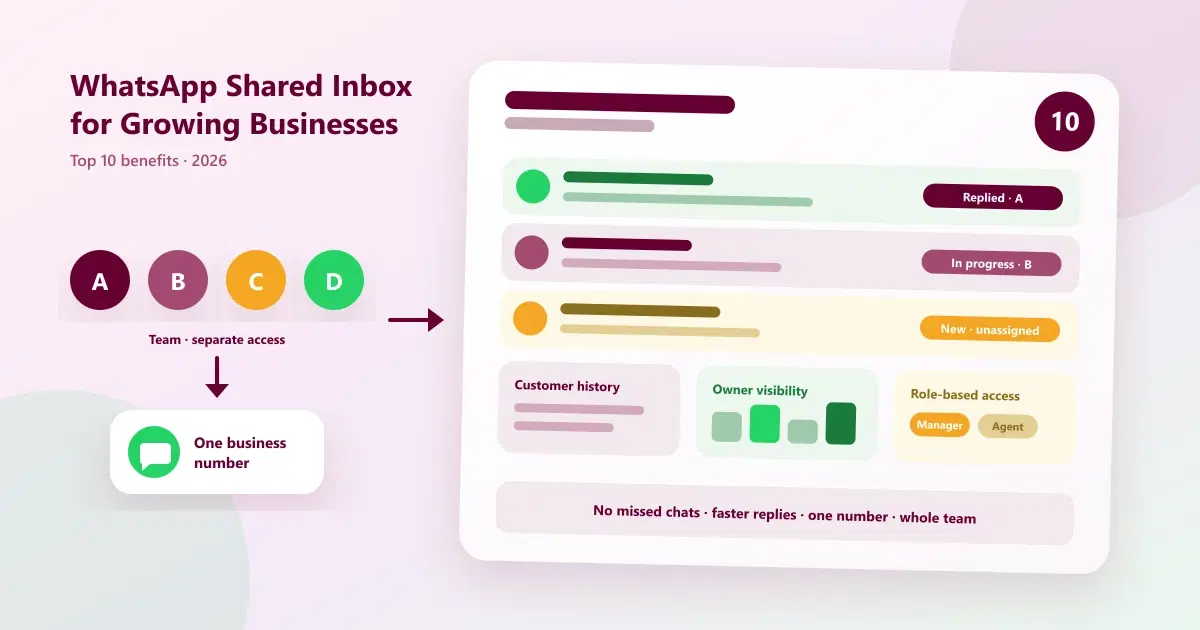
The 10 biggest WhatsApp shared inbox benefits for growing businesses: fewer missed chats, faster replies, owner visibility and customer history.
When a business is small, one person answers WhatsApp and knows every customer. Then the business grows. A second person joins, then a third, and suddenly customer messages are spread across phones and personal chats. A customer is answered twice, another is not answered at all, and the owner has no idea what is happening in the conversations that bring in the money.
A WhatsApp shared inbox, also called a WhatsApp team inbox, solves this by putting every customer conversation in one place that the whole team can work from. This guide lists the ten WhatsApp shared inbox benefits that matter most for growing businesses, explains how to measure them, and shows how to roll one out without disruption. It is about the benefits, not the basics. If you want the definition and feature list first, read what a WhatsApp shared inbox is.
Quick Answer: What Are the Benefits of a WhatsApp Shared Inbox?
The main benefits of a WhatsApp shared inbox are fewer missed or duplicate replies, faster responses, clear owner visibility, full customer history, safer team access without sharing a phone, smoother handovers, and a base for follow-ups and growth. It lets a whole team reply to customers from one business number.
Signs Your Business Needs a Shared WhatsApp Inbox
A shared WhatsApp inbox for business becomes worth it when WhatsApp stops being one person's job. Typical signs:
- Two or more people reply to customers from the same number or from personal phones.
- Customers are sometimes answered twice, or not at all.
- Nobody can say who last spoke to a customer, or what was promised.
- Replies slow down when the usual person is busy, on leave or has left.
- You, as the owner, cannot see what is going on without asking staff.
- Customer details live in someone's memory, a notebook or a spreadsheet.
If several of these are true, you are likely past the point where one phone works. Our guide to top 10 problems managing leads on WhatsApp covers the same pain from the lead side.
The 10 WhatsApp Shared Inbox Benefits at a Glance
| # | Benefit | Problem it solves | Metric to watch |
|---|---|---|---|
| 1 | No missed or duplicate replies | Messages lost across phones | Unanswered chats |
| 2 | Faster replies | Customers waiting too long | First response time |
| 3 | Owner visibility | No view of team conversations | Open chats and response times |
| 4 | Full customer history | Customers repeating themselves | Repeat questions |
| 5 | Team access without sharing a phone | Shared logins and personal numbers | Number of active agents |
| 6 | Smooth handovers | Lost context when staff change | Dropped conversations |
| 7 | Privacy and control | Everyone seeing everything | Access issues |
| 8 | Consistent replies | Different answers from different people | Customer complaints |
| 9 | Follow-ups and conversions | Enquiries that go cold | Enquiry-to-sale rate |
| 10 | Scales without more phones | Growth adds chaos | Chats per agent |
Top 10 Benefits of a WhatsApp Shared Inbox for Growing Businesses
1. No more missed or duplicate replies
The problem: with messages spread across phones, some are never seen and others are answered twice.
The benefit: every message lands in one inbox that the whole team sees. Alerts flag new messages, and each conversation can have an owner, so a customer gets one clear reply instead of two or none. This is the most immediate improvement most businesses notice.
2. Faster replies and shorter waiting times
The problem: customers who wait too long message another business.
The benefit: when several people can reply from one inbox, a message does not wait for one busy person. Saved replies and templates cut the typing time for common questions. Faster replies matter most for new enquiries, where the first business to respond often has the advantage.
3. Visibility for the business owner
The problem: the owner cannot see what staff are telling customers, or how many chats are waiting.
The benefit: a shared inbox gives owners and managers visibility into conversations, subject to the access you set. You can check that important enquiries are handled, spot slow replies, and review the tone used with customers, without asking staff for updates. With reporting on top, you can see response and conversion patterns, not just individual chats.
4. Full customer history in every conversation
The problem: customers repeat themselves because the person replying does not know what was said before.
The benefit: conversation history, tags and internal notes stay attached to the customer. In a WhatsApp CRM, that can also include bookings, invoices and visit history. Any team member can pick up a conversation with context, so customers feel recognised instead of re-interviewed.
5. Team access without sharing a phone or number
The problem: staff share one phone or one login, or reply from personal numbers.
The benefit: each team member uses their own access to the same business number. There is no passing the phone around and no personal numbers shown to customers. When someone leaves, you remove their access instead of changing a shared password or losing the conversations on their phone.
6. Smooth handovers and continuity
The problem: when someone is off or leaves, their conversations go quiet.
The benefit: because the history and notes live in the inbox, another team member can take over a conversation at any time. Shift changes, leave and staff turnover stop being a risk to customer relationships.
7. Better privacy and control with role-based access
The problem: either nobody has access to the shared number, or everyone sees everything.
The benefit: role-based access lets you decide who can see and reply to which conversations. A new hire might handle only simple enquiries, while a manager sees more. This protects customer information and keeps workflows tidy as the team grows.
8. Consistent, on-brand customer communication
The problem: different people give different prices, policies and tones.
The benefit: shared templates and saved replies keep answers accurate and consistent. Customers receive the same information regardless of who replies, which builds trust.
9. A base for follow-ups and conversions
The problem: customers ask about a service or product and then go quiet, and nobody follows up.
The benefit: with tags and a customer record on each chat, you can see who is waiting for a decision and follow up. When the inbox is part of a WhatsApp CRM, follow-ups can be scheduled and conversations can lead directly to bookings and sales. Our guide to how to organize WhatsApp customers shows how to set this up.
10. It scales as you grow, without more phones
The problem: each new employee or branch adds more phones and more mess.
The benefit: you add people, not phones. The number customers know stays the same, and the inbox grows with the team. Some businesses can also keep using the WhatsApp Business app on the same number through WhatsApp Coexistence, where they are eligible; see WhatsApp Coexistence explained, and note that some app features, such as broadcast lists, change when a number is connected.
What to Set Up at Each Growth Stage
You do not need everything on day one. This shows how a WhatsApp team inbox typically evolves with the business.
| Stage | Typical situation | What to set up first |
|---|---|---|
| 1 to 3 people | Owner and one or two staff share WhatsApp | Shared inbox, saved replies, a simple owner rule for each chat |
| 4 to 10 people | Sales, support and operations all use WhatsApp | Tags, internal notes, role-based access, a response-time target |
| 10+ people or several branches | Many agents, many enquiry types | Clear roles, reporting, follow-up automation, and a regular review |
WhatsApp Shared Inbox vs WhatsApp CRM
A shared inbox is the front door. A WhatsApp CRM is the whole building. The inbox puts every conversation in one place. The CRM adds the customer record behind it: tags, history, follow-ups, campaigns and reports. The benefits above get stronger when both work together, which is why most WhatsApp customer communication software combines the two, and why many businesses start with the inbox and add CRM features as they grow.
| Capability | Shared inbox | WhatsApp CRM |
|---|---|---|
| One inbox for the whole team | Yes | Yes |
| Internal notes and tags | Typically | Yes |
| Customer records and history | Limited | Full profile |
| Scheduled follow-ups | Usually not | Yes |
| Targeted campaigns | Usually not | Yes |
| Reports on replies and results | Basic or none | Yes |
For more, read what WhatsApp CRM is and how WhatsApp CRM works.
How to Measure WhatsApp Shared Inbox Benefits
Take a baseline for two weeks before you switch, then compare after a month. Useful numbers:
- First response time: how long a new message waits for a reply.
- Unanswered or stale chats: conversations that have gone without a reply.
- Enquiry-to-sale rate: sales divided by enquiries received.
- Follow-ups completed: how many promised follow-ups actually happened.
- Customer complaints about repeated questions or mixed messages.
- Time spent by the owner checking on conversations.
Do not expect a precise percentage improvement. Results depend on your starting point and team. What you want to see is a clear movement in the right direction. For campaign numbers, see WhatsApp marketing metrics.
A Simple Rollout Plan
- Decide the rules. Who owns a chat, what the target response time is, and what the tags mean.
- Connect the number. Use the official WhatsApp Business Platform through your provider, and check eligibility if you want to keep using the Business app.
- Add the team. Give each person their own access and the right role.
- Load your saved replies. Start with your five most common questions.
- Run it for two weeks, then review. Look at slow chats, missed follow-ups, and what staff find awkward, and adjust.
Common Mistakes to Avoid
- No ownership rule. Without it, everyone assumes someone else is replying.
- Too many tags. Keep a short, agreed set.
- Giving everyone full access. Use roles.
- Over-automating. Customers should be able to reach a person.
- Ignoring WhatsApp's rules. Message only opted-in customers, and use approved templates for business-initiated messages outside the 24-hour customer service window.
- Not reviewing. Check the numbers every week for the first month.
How Cleomitra's Shared Inbox Delivers These Benefits
Cleomitra's WhatsApp platform combines a shared inbox with a WhatsApp CRM. Based on what the product offers:
- Shared team inbox: all customer messages are captured in one inbox, with instant alerts and smart routing, and no dependency on personal numbers.
- Customer history: view chat logs, bookings, invoices and visit history in one place.
- Tags, templates and internal notes: respond faster with templates, organise leads with tags, and guide the team with private notes.
- Multi-user and role-based access: let the whole team respond with their own access, and control who sees what.
- Reports: track metrics such as messages sent, responses, booking conversions and campaign performance.
- Coexistence for eligible businesses: keep your existing number and use the WhatsApp Business app alongside the platform. See the WhatsApp Coexistence page. Some app features, such as broadcast lists, change when a number is connected.
Plan details, based on the current Cleomitra pricing:
- Engage Starter (₹999/month) includes a basic shared inbox, manual campaigns and one ready-made Autopilot flow, but no CRM.
- Engage Growth (₹1,499/month) adds the CRM with the shared inbox, an unlimited flow builder, scheduled and recurring campaigns, and reports and insights.
- Engage Pro (₹2,499/month) adds unlimited pipelines and flows, and includes Instagram and email.
- Service OS Growth (₹2,799/month) and Service OS Pro (₹3,999/month) add appointments and booking, billing and more for service businesses.
Meta's WhatsApp message charges are separate from the subscription. Check the pricing page for exactly what each plan includes. To compare tools, see top 10 WhatsApp CRM software in India.
Related Guides
- What Is a WhatsApp Shared Inbox? Features, Benefits & Best Practices
- What Is WhatsApp CRM?
- How Does WhatsApp CRM Work? From First Message to Repeat Customer
- WhatsApp CRM for Small Businesses in India (2026): Keep Your Number, Scale Campaigns
- Best Omnichannel Communication Platforms in 2026
- Top 10 WhatsApp Tasks Businesses Should Automate in 2026
Ready to Give Your Team One WhatsApp Inbox?
See how Cleomitra can put every customer conversation in one shared inbox, with customer history and team access built in.
Frequently Asked Questions
What are the benefits of a WhatsApp shared inbox?
The main benefits are fewer missed or duplicate replies, faster responses, owner visibility, full customer history, team access without sharing a phone or number, smoother handovers, role-based privacy, consistent replies, easier follow-ups, and the ability to add people instead of phones as the business grows.
Is a shared WhatsApp inbox for business worth it for a small business?
It is worth it once more than one person replies to customers on WhatsApp. Typical signs are duplicate or missed replies, shared phones, and no record of who spoke to a customer. If one person handles every chat and customer numbers are low, the free Business app may be enough for now.
What is the difference between a WhatsApp shared inbox and a WhatsApp CRM?
A shared inbox puts every WhatsApp conversation in one place for the team. A WhatsApp CRM adds the customer record behind it: history, tags, follow-ups, campaigns and reports. The inbox handles conversations, while the CRM turns them into organised customer relationships and measurable sales.
How does a shared inbox give owners visibility?
Owners and managers can see conversations according to the access you set, so they can check that enquiries are handled and spot slow replies without asking staff. With reporting, you can also review response and conversion patterns. Role-based access lets you decide who sees which chats.
Can a WhatsApp team inbox use my existing number?
Often yes. Many providers connect your existing WhatsApp number, and WhatsApp Coexistence lets eligible businesses keep using the Business app alongside the platform. Eligibility depends on Meta's rules and your provider, and some app features, such as broadcast lists, change, so confirm the details first.
Do I need the WhatsApp Business API for a shared inbox?
For a proper team inbox, usually yes. Most shared inboxes connect through the WhatsApp Business Platform, often via a provider. The free Business app supports only a small number of linked devices, which is fine for tiny teams but harder to manage as you grow.
How do I measure whether a shared inbox is working?
Take a two-week baseline, then compare after a month. Track first response time, unanswered chats, enquiry-to-sale rate, follow-ups completed, and complaints about repeated questions. Look for movement in the right direction rather than a fixed percentage, because results depend on your starting point and team.
How much does a WhatsApp shared inbox cost in India?
Costs have two parts: the platform subscription, usually priced in rupees per month, and Meta's WhatsApp message charges, which are separate and can change. At Cleomitra, plans start at ₹999 per month with a basic shared inbox, and the CRM with the shared inbox starts at ₹1,499.
