

How to Organize WhatsApp Customers: Tags, Segments, Records & Follow-Ups
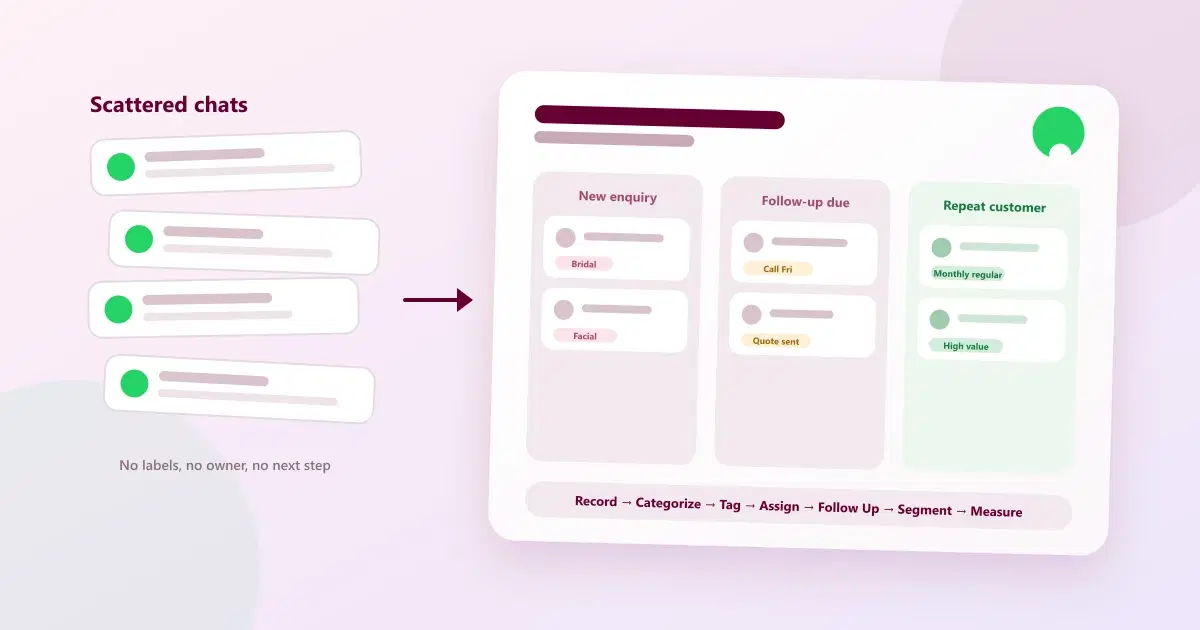
Learn how to organize WhatsApp customers using customer records, tags, segments and follow-ups to improve lead management, sales and retention.
A customer messages on WhatsApp, gets a reply, and the conversation moves on. A week later nobody remembers what they asked for, who spoke to them, or whether anyone promised to call back. The messages are still there — buried in a long chat list — but the information is not usable.
This guide is about the fix: how to organize WhatsApp customers with structured records, consistent tags, clear segments, and follow-ups that actually happen — the practical core of WhatsApp customer management. It focuses on the practical setup — how to organize WhatsApp contacts into a usable customer database — not on choosing software.
Quick Answer: How Should Businesses Organize WhatsApp Customers?
Use one simple sequence for every customer: Record → Categorize → Tag → Assign → Follow Up → Segment → Measure.
- Record: save each customer's name, number, and source in one place instead of leaving them in a chat thread.
- Categorize: give every customer a clear status, such as new enquiry, qualified lead, or repeat customer.
- Tag: add short labels for interest, service, or behaviour so customers can be found later.
- Assign: make one team member responsible for each customer or follow-up.
- Follow Up: set a date for the next contact so it does not depend on memory.
- Segment: group customers who share a status or tag so each group gets a relevant message.
- Measure: review how many customers move between statuses to see what is working.
What Does It Mean to Organize WhatsApp Customers?
To organize WhatsApp customers means turning scattered chats into structured customer data. Each person has a record in a simple WhatsApp customer database, with a status, labels, an owner, and a next action. The team can then see who a customer is and what should happen next without scrolling through old messages.
This is the practical meaning of WhatsApp customer management: the conversation stays on WhatsApp, but the information around it lives in an organized system.
How to Categorize WhatsApp Customers
A status tells everyone where a customer stands. Keep the list short and make the meaning of each status obvious, so two team members would label the same customer the same way.
New enquiries
People who have just messaged for the first time and have not yet been qualified. The goal is a fast first reply and a clear next step.
Qualified leads
Enquiries that have a real need, a realistic timeline, and the ability to buy. These deserve the most attention from the team.
Follow-up required
Customers waiting on something from you — a quote, a callback, an answer — or who have gone quiet after interest. Every customer in this group needs a follow-up date.
Existing customers
People who have bought or used a service at least once. They need good service and relevant updates, not sales pressure.
Repeat customers
Customers who have come back more than once. They are worth recognising and keeping informed about new options.
High-value customers
Customers who spend more or buy more often than most. Define "high value" once, for example by total spend over a period, so the label stays consistent.
Inactive customers
Past customers who have not engaged for a set period. A short, relevant message is more useful than silence.
Lost leads
Enquiries that did not convert. Record the reason where you can — price, timing, went elsewhere — because that information improves later decisions.
How WhatsApp Customer Tags Help Businesses
Statuses describe where a customer is. WhatsApp customer tags describe who they are and what they care about. A tag is a short label — for example "bridal enquiry" or "site visit done" — that lets you filter customers instantly instead of searching through chats.
Good tags are consistent, short, and agreed by the whole team. Here are practical examples by business type.
Salons
- Service interest: hair colour, facial, bridal, keratin
- Visit pattern: monthly regular, occasional, first-time
- Stage: bridal enquiry, trial booked
Example: a customer tagged "hair colour" and "monthly regular" can be reminded when a touch-up is due.
Clinics
- Visit type: first consultation, follow-up visit, routine check
- Admin status: follow-up due, missed appointment
Keep clinic tags administrative. Avoid putting sensitive medical details in a tag, and follow your local privacy requirements.
Real estate
- Requirement: 2 BHK, 3 BHK, plot, rental
- Stage: site visit scheduled, site visit done, negotiating
- Source: referral, portal, social media
Example: tag buyers by requirement so a new matching listing goes only to the right people.
Retail
- Category interest: apparel, accessories, home
- Behaviour: festive buyer, repeat buyer, one-time buyer
- Preference: size, brand, price-sensitive
Example: customers tagged "festive buyer" can hear about seasonal stock before it sells out.
7 Ways to Organize WhatsApp Customers
1. Create structured customer records
What it means: each customer has one record with the key fields — name, number, source, status, and notes — instead of existing only inside a chat.
Why it matters: well-kept WhatsApp customer records are searchable and shareable. A chat thread depends on whoever happens to remember it.
Example: a salon saves "Priya, referral, bridal enquiry, wedding in March" as a record, so any stylist can pick up the conversation.
2. Use consistent customer tags
What it means: agree on a short list of tags and use the same wording every time.
Why it matters: "Facial", "facials", and "face treatment" become three different groups unless the team standardises them.
Example: a clinic uses only "first consultation", "follow-up visit", and "routine check" — nothing else.
3. Segment customers based on their needs
What it means: WhatsApp customer segmentation groups customers who share a status, tag, or behaviour — for example, everyone tagged "festive buyer" who has not purchased in six months.
Why it matters: one message to everyone is easy to ignore. A message to a relevant group feels useful.
Example: a retailer messages only past festive buyers about new seasonal stock.
4. Assign customers to the right team member
What it means: every customer, or every follow-up, has one named owner.
Why it matters: shared responsibility often becomes no responsibility. Ownership prevents leads being ignored or contacted twice.
Example: a real estate team assigns each new enquiry to one agent, who is then accountable for the next step.
5. Maintain conversation and interaction history
What it means: keep a short, current note of what was discussed and decided, linked to the customer.
Why it matters: customers should not have to repeat themselves to every new team member.
Example: "Asked about keratin, wants weekend slot, budget concern" lets anyone continue the conversation smoothly.
6. Set follow-up dates and reminders
What it means: good WhatsApp follow-up management gives every customer who needs a next step a specific date, not just "follow up soon".
Why it matters: a date can be reviewed and reminded. An intention cannot.
Example: a quote sent today gets a follow-up reminder in three days. For ideas on automating routine reminders, see how WhatsApp automation helps salons book more appointments.
7. Track customer status from enquiry to repeat purchase
What it means: update each customer's status as they move from new enquiry through to repeat customer.
Why it matters: counting customers at each stage shows where people drop off and what to improve.
Example: if many qualified leads stay in "follow-up required", the team knows follow-up is the bottleneck.
What Happens When WhatsApp Customers Are Not Organized?
Disorganised customer data causes small, everyday losses:
- Missed follow-ups: promised callbacks live only in someone's memory.
- Lost leads: enquiries sink down the chat list unanswered.
- Duplicate communication: two people message the same customer with different information.
- Poor personalization: customers receive generic messages about things they never asked for.
- Forgotten customers: past customers are never contacted because nobody can find them.
- Team ownership problems: nobody is sure who is responsible for a customer.
- Lack of sales visibility: the owner cannot see how many enquiries became customers.
The root cause is the same each time: information sits in conversations instead of in a structure the whole team can use. For a deeper look at lead-specific problems, see the top 10 problems businesses face when managing leads on WhatsApp.
Can You Manage WhatsApp Customers Without a CRM?
Yes, for a while. Manual methods — the WhatsApp Business app's labels, a spreadsheet, a shared document — can work when volume is low. The honest question is when they stop working.
| Situation | Manual methods | Structured customer management |
|---|---|---|
| Small customer volume | Usually enough. One person can remember most customers. | Optional. Helpful mainly if you plan to grow. |
| Growing customer volume | Starts to strain. Spreadsheets fall behind and follow-ups slip. | Becomes valuable for records, statuses, and reminders. |
| Multiple team members | Unreliable. Information sits on different phones and files. | Needed for shared records, ownership, and visibility. |
| High customer / message volume | Not practical. Messages and tasks are missed. | Necessary for tags, segments, automation, and reporting. |
A simple test: Could a new team member understand the status of a customer and the next action without asking someone else? If not, the process has outgrown manual methods. To understand what that next step involves, read What Is WhatsApp CRM? and how WhatsApp CRM works from first message to repeat customer.
What Should an Organized WhatsApp Customer Record Include?
A good customer record answers one question: what does the team need to know to help this customer right now? To manage customer data on WhatsApp well, you do not need dozens of fields — a small, consistent set is more useful than a long form nobody fills in. Whether the record lives in a tool or a spreadsheet, these ten fields cover most businesses:
| Field | What to record | Why it matters |
|---|---|---|
| Customer name | Full name as the customer uses it | Makes messages personal and avoids mix-ups |
| Phone number | WhatsApp number with country code, plus any alternate contact or preferred language | The unique identifier that prevents duplicate records |
| Lead source | Instagram, referral, website, walk-in, ad | Shows which channels bring real customers |
| Product / service interest | What they asked about or bought, in a few words | Lets you follow up with something relevant |
| Customer status | New enquiry, qualified, existing, repeat, inactive, lost | Shows where each customer is in the journey |
| Tags / categories | Short labels for interest, behaviour, stage, or group (such as high-value), written the same way by everyone | Makes customers easy to find and group into segments |
| Last interaction | The date, plus a one- or two-line summary of the latest conversation | Tells the next person what already happened without reading the whole chat |
| Notes | Preferences, constraints, and anything the customer asked you to remember | Helps any team member give a consistent, personal reply |
| Follow-up date | The date and the action planned, with a named owner | Turns intention into a scheduled action with clear ownership |
| Purchase / history | What they bought, when, and how often | Supports repeat and reactivation messages |
Keep the record short enough that people actually fill it in. A field nobody uses should be removed, and a record that cannot answer "what happens next?" needs something added. If a spreadsheet or shared document is no longer enough, you can compare WhatsApp CRM platforms in India.
How Cleomitra Helps Organize WhatsApp Customers
Cleomitra's Contacts & Follow-Ups feature page describes tools built around this structure. They include:
- Customer profiles that bring together visit history, notes, conversations, and follow-ups in one place
- Tags — premade and custom — with filters and bulk import for existing contact lists
- Segmentation, so campaigns can target a specific group of customers
- A follow-up manager with reminders and tracking of assigned tasks
- Automation and campaigns on WhatsApp for repeatable messages
Customer profiles, notes, conversation history and follow-up management can be handled through a structured CRM. Cleomitra's CRM functionality is available from the Engage Growth plan, while Engage Starter provides the basic shared inbox experience. See the current Cleomitra pricing for plan details.
Related Guides
- What Is WhatsApp CRM?
- How Does WhatsApp CRM Work? From First Message to Repeat Customer
- Top 10 WhatsApp CRM Software in India (2026)
- How WhatsApp Automation Helps Salons Book More Appointments
Want to See Your Customers Organized?
See how Cleomitra can bring your customer records, tags, and follow-ups together.
Frequently Asked Questions
What is WhatsApp customer management?
WhatsApp customer management is the practice of turning WhatsApp conversations into organized customer information. Each customer has a record, a status, tags, an owner, and a follow-up date, so the whole team can see who the customer is and what should happen next, instead of searching through old chats.
How do I organize customers on WhatsApp?
Start by saving each customer's name, number, and source in one place. Then give them a status, add consistent tags, assign an owner, and set a follow-up date. Group customers with shared tags into segments, and review how many move between statuses so you can see what is working.
How do I categorize WhatsApp customers?
Use a short list of statuses that show where each customer stands: new enquiry, qualified lead, follow-up required, existing customer, repeat customer, high-value customer, inactive customer, and lost lead. Define each status clearly so every team member applies it the same way.
Can I tag customers on WhatsApp?
The WhatsApp Business app lets you apply labels to chats, which works for basic organization. Tools that connect to WhatsApp can add richer tags tied to customer records, such as service interest or behaviour, which can then be filtered and used to build segments.
What customer information should I track?
Track name, phone number, lead source, product or service interest, customer status, assigned team member, last interaction, purchase history, follow-up date, and segment. A small, consistent set of fields is more useful than a long form that team members do not fill in.
How do I manage WhatsApp customers with a team?
Keep customer records and conversations in a shared system rather than on individual phones, and assign each customer or follow-up to one named owner. Agree on a common list of statuses and tags, and keep short notes so any team member can continue a conversation.
Can WhatsApp customer management be automated?
Partly. Predictable steps such as confirmations, reminders, and follow-up prompts can be automated, and tags can sometimes be applied from interactions. Automation works best for repeatable actions, while conversations needing judgement or personal attention should still be handled by a person.
When should a business use a CRM for WhatsApp customers?
Consider a CRM when more than one person handles customers, follow-ups are being missed, or you cannot easily say how many enquiries became customers. If the team cannot see what each customer needs next without asking the owner, manual methods have likely outgrown their usefulness.
