
How Does WhatsApp CRM Work? From First Message to Repeat Customer
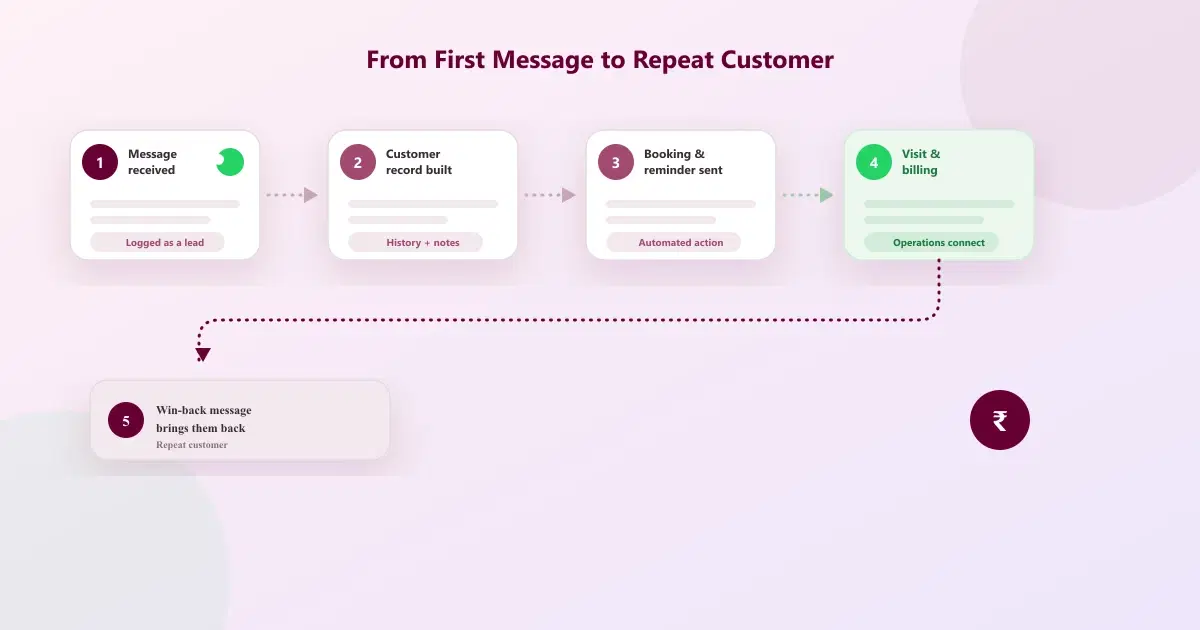
How WhatsApp CRM works in practice: from the first message a customer sends, through booking and billing, to the follow-up that brings them back.
Quick answer: A customer may discover a business on Instagram, send a WhatsApp message, ask a question, book an appointment, receive a reminder, pay for a service, and return months later. Understanding how WhatsApp CRM works means following that whole journey — not just the chat window where it starts.
The Customer Journey Is Bigger Than the Chat
A customer may discover a business on Instagram, send a WhatsApp message, ask a question, book an appointment, receive a reminder, pay for a service, and return months later. If every step is managed in a different place, customer context gets lost.
WhatsApp CRM connects the conversation to the workflow around it.
Step 1: Capture the Conversation
The journey starts when a customer messages the business or responds to an approved business message. A CRM layer can associate the conversation with customer information so the team does not have to reconstruct context from memory or multiple phones.
Step 2: Understand the Customer
A useful customer record can include contact details, notes, conversation history, and relevant business information. The purpose is not to collect information for its own sake. It is to help the next team member understand what has already happened.
Step 3: Take the Next Action
The next action might be answering a question, sending a quote, booking an appointment, reminding a customer, or following up after no response. This is where WhatsApp CRM automation is most useful — when the action is predictable and repeatable, software can trigger it instead of a person needing to remember.
Step 4: Connect Operations
For businesses that need it, WhatsApp can sit alongside bookings, billing, and stock. Cleomitra Service OS is designed around this model. A customer conversation can lead into an appointment and billing workflow instead of ending when the chat ends.
Step 5: Bring Customers Back
Retention is where many businesses underuse WhatsApp. Birthday messages, reminders, and win-back campaigns can create structured reasons to reconnect with customers. Cleomitra includes these capabilities on relevant plans.
The goal is not more messages. The goal is fewer missed opportunities and a more consistent WhatsApp customer management journey.
Related Guides
Take the Journey Beyond "Hello"
See how Cleomitra takes the customer journey beyond "Hello" on WhatsApp.
Frequently Asked Questions
Is automation required for WhatsApp CRM to work?
No. Automation is one component of a CRM workflow. A business can use a WhatsApp CRM purely for organising conversations and customer records manually, and add automation for specific repeatable steps later.
Can humans still reply, or does everything run automatically?
Supported setups can combine manual conversations with automated workflows. A staff member can reply directly to a customer at any point, while automation handles predictable steps like reminders or confirmations.
Is WhatsApp CRM useful for clinics and salons?
Yes, particularly where enquiries, appointments, and repeat visits matter. The enquiry-to-appointment-to-reminder-to-return cycle is exactly the kind of repeatable journey a WhatsApp CRM is built to support.
