
What Is a WhatsApp Shared Inbox? Features, Benefits & Best Practices
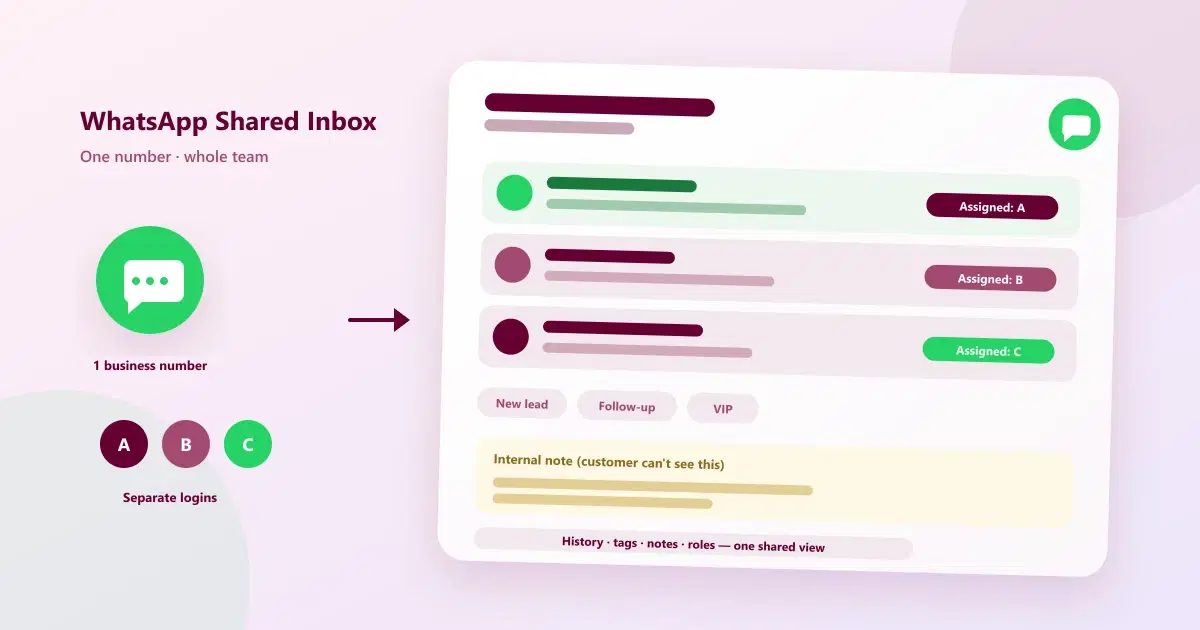
A WhatsApp shared inbox lets your whole team reply from one WhatsApp number. Learn how it works, the key features, benefits, and best practices for teams.
It usually starts with one phone. The owner answers customers on WhatsApp, then a second person joins, then a third. Soon the phone is passed around, nobody is sure who replied to whom, and a customer asks the same question twice because the first answer was given by someone who has since left for the day.
A WhatsApp shared inbox fixes that. This guide explains what it is, how it works, the features that matter, and the best practices that keep a team's WhatsApp conversations organised.
Quick Answer: What Is a WhatsApp Shared Inbox?
A WhatsApp shared inbox is a team inbox where several people reply to customers from one WhatsApp business number. Each agent logs in separately, and conversations can be assigned, tagged, and annotated, so the whole team sees the same history and nobody has to share a phone or a login.
How a WhatsApp Shared Inbox Works
A WhatsApp team inbox sits between your WhatsApp number and your staff. In practice, it follows five steps:
- Connect the number. The business number is connected to a platform through the WhatsApp Business Platform (API), or in supported setups alongside the Business app using WhatsApp Coexistence.
- Messages arrive in one place. Every customer message lands in a common inbox that the team can see, instead of on one person's phone.
- Agents log in individually. Each team member uses their own login, so there is no password sharing and no number sharing.
- Conversations are owned and organised. A chat can be assigned or claimed, tagged, and marked with internal notes that the customer never sees.
- History stays with the customer. Past messages and notes remain attached to the customer, so any agent can continue the conversation with context.
For the technical layer underneath, see what the WhatsApp Business API is and how it works.
WhatsApp Business App vs a Shared Inbox for Teams
The free WhatsApp Business app can be used by more than one person, but it was designed for a small number of users. WhatsApp's Help Center describes linking up to four additional devices alongside the primary phone, and Meta can change these limits, so check the current rules. A shared inbox is built for teamwork.
| Factor | Business app (linked devices) | WhatsApp shared inbox |
|---|---|---|
| Number of people replying | A small number of linked devices | Built for a whole team with separate logins |
| Conversation ownership | Labels for sorting; limited assignment | Assign or claim chats so one person owns each |
| Internal notes | Limited | Typically included, hidden from the customer |
| Customer context | Mostly the chat itself | History, tags, and profile attached to the customer |
| Access control | Whoever holds the phone or device | Role-based access in many platforms |
| Automation and handoff | Basic away and greeting messages | Automated replies with handover to a person |
For the wider comparison between the two WhatsApp products, read WhatsApp Business App vs WhatsApp Business API.
Key Features of a WhatsApp Shared Inbox
When you evaluate a shared inbox for WhatsApp Business, these are the features that make the difference between a tidy team inbox and a noisy one:
- Multi-user access: every agent has their own login to the same WhatsApp number.
- Chat assignment and routing: each conversation has an owner, and new messages reach the right person or team.
- Internal notes: private comments that help colleagues without the customer seeing them.
- Tags and labels: a consistent way to mark interest, stage, or issue type.
- Conversation history and customer profile: the full context in one place.
- Role-based permissions: control who can see, reply to, or export which chats.
- Quick replies and templates: saved answers for repeated questions, with approved templates for business-initiated messages.
- Alerts and filters: notifications for new or unread messages, and filters to find what needs attention.
- Automation with human handover: automated replies that pass the chat to a person when needed.
- Reporting: simple numbers on response time and workload, so managers can spot bottlenecks.
Benefits of a WhatsApp Shared Inbox
- Faster, more consistent replies. Messages are visible to the whole team, so they are less likely to sit unanswered.
- No number or password sharing. Each person uses their own login, which is safer and easier to manage when staff change.
- Clear ownership. Someone is responsible for every conversation, which reduces duplicate replies and dropped chats.
- Continuity. If an agent is off or leaves, the conversation history stays with the customer.
- Better context. Notes, tags, and history help any agent give a relevant answer without asking the customer to repeat themselves.
- Room to grow. More agents can be added without more phones.
- Visibility for managers. Workload and response patterns can be reviewed instead of guessed at.
Who Needs a WhatsApp Shared Inbox?
A shared inbox becomes worth it when WhatsApp stops being one person's job. Common signs:
- More than one person replies to customers on the same number.
- A phone gets passed between staff, or staff share a login.
- Customers sometimes get two different answers, or none at all.
- Nobody can say who last spoke to a customer.
- Replies slow down when the usual person is busy or away.
Typical users include clinics, salons, schools and colleges, real estate teams, retailers, and support teams that handle customer questions over WhatsApp. If this sounds familiar, you may also be outgrowing manual tracking, a situation covered in top 10 signs your business has outgrown WhatsApp and Excel.
Best Practices for a WhatsApp Team Inbox
- Give every chat one owner. Shared responsibility often becomes no responsibility, so assign or claim each conversation.
- Agree on a response-time target. Decide what "fast enough" means for your business and review it regularly.
- Use a small, consistent set of tags. Agree the wording once so everyone labels customers the same way. For a full approach, see how to organize WhatsApp customers.
- Write internal notes for the next person. A one-line summary of what was agreed saves the next agent from rereading the whole chat.
- Save replies for repeated questions. Quick replies keep answers consistent and save typing time.
- Automate the routine, hand over the rest. Let automation handle greetings and common questions, and make it easy to reach a person. Our guide to WhatsApp tasks to automate shows where to start.
- Set working hours and an away message. Tell customers when to expect a reply outside hours.
- Define an escalation path. Decide who handles complaints, refunds, or urgent issues.
- Limit access by role. Give staff only the chats and settings they need.
- Review the inbox weekly. Look at unanswered chats, slow replies, and common questions, then adjust.
Common Mistakes to Avoid
- Sharing one login or one phone. It creates confusion about who replied and makes it hard to remove access when someone leaves.
- No clear ownership. Everyone assumes someone else is handling the chat.
- Inconsistent tags. "Facial", "facials", and "face treatment" become three groups.
- Over-automating. Customers get frustrated when they cannot reach a real person.
- Ignoring WhatsApp's rules. Messaging without opt-in or outside the allowed window can lead to blocks.
WhatsApp Rules Your Team Inbox Must Follow
A shared inbox changes who replies, not WhatsApp's rules:
- Get opt-in. Message customers who have agreed to hear from you.
- Respect the customer-service window. Replies are straightforward while a customer's message is recent; business-initiated messages sent outside that window generally need an approved template.
- Use official access. Connect through the WhatsApp Business Platform or a provider built on it, rather than unofficial tools that may put your number at risk.
- Keep customer data secure. Use role-based access and remove logins promptly when staff leave.
How to Choose a WhatsApp Shared Inbox
- Check number support. Can you keep your existing WhatsApp number, and does it work alongside the Business app?
- Look at team features. Separate logins, assignment, notes, tags, and permissions.
- Test the handover. If you use automation, confirm a person can take over smoothly.
- Check customer context. Does the inbox show history and profile, or only the chat?
- Understand the costs. Separate the platform subscription from Meta's WhatsApp messaging charges.
- Try it with real chats. Run a short trial with a few real conversations and your actual team.
How Cleomitra's WhatsApp Shared Inbox Works
Cleomitra's WhatsApp platform page describes a shared team inbox built for this workflow. Based on what the product offers, it includes:
- A shared team inbox with full customer profile visibility, so conversations don't depend on personal numbers
- Conversation history, tags, and internal notes in one place
- Multi-user access and role-based chat access, so each person has their own login and the right level of visibility
- Instant alerts and smart routing for new customer messages
- Coexistence support in eligible setups, so you can keep using the WhatsApp Business app alongside the platform (eligibility must be checked)
- An omnichannel inbox that can also bring Instagram, email, and website chat into the same place
Engage Starter includes a basic shared inbox, and the shared inbox with CRM begins at the Engage Growth plan. See the current Cleomitra pricing for plan details.
Related Guides
- What Is WhatsApp CRM?
- What Is WhatsApp Business API and How Does It Work?
- WhatsApp Business App vs WhatsApp Business API: What's the Difference?
- How to Organize WhatsApp Customers: Tags, Segments, Records & Follow-Ups
- Best Omnichannel Communication Platforms in 2026
Ready to Give Your Whole Team One WhatsApp Inbox?
See how Cleomitra can bring your team's WhatsApp conversations into one shared inbox.
Frequently Asked Questions
What is a WhatsApp shared inbox?
A WhatsApp shared inbox is a team inbox that lets several people reply to customers from one WhatsApp business number. Each agent has a separate login, and conversations can be assigned, tagged, and annotated with internal notes, so the whole team works from the same history without sharing a phone.
Can multiple people use one WhatsApp number?
Yes, in two ways. The WhatsApp Business app allows a small number of linked devices, and a shared inbox built on the WhatsApp Business Platform lets a whole team reply from one number with separate logins. For more than a few people, a shared inbox is usually the more manageable option.
Is a WhatsApp shared inbox the same as WhatsApp Web?
No. WhatsApp Web mirrors one account on a browser and is meant for individual use. A shared inbox is built for teams, with separate agent logins, chat assignment, internal notes, tags, and permissions. It also keeps customer history attached to the customer instead of to one person's device.
Do I need the WhatsApp Business API for a shared inbox?
For a proper team inbox, usually yes. Most shared inboxes connect through the WhatsApp Business Platform, often via a provider. In supported setups, WhatsApp Coexistence lets you keep using the Business app on the same number, though eligibility and features depend on Meta's current setup and the provider.
Can I assign WhatsApp chats to team members?
Yes, in a shared inbox. Conversations can be assigned or claimed so one person owns each chat, which prevents duplicate replies and dropped messages. The WhatsApp Business app itself offers labels for sorting but is more limited for team assignment, so check the specific features of any platform you choose.
Will customers know that several agents are replying?
Customers see one WhatsApp business number and one business profile. Different agents may reply, but it feels like one conversation with the business. Using a consistent tone, saved replies, and notes about previous discussions helps the experience stay smooth when conversations pass between team members.
Can I keep my existing WhatsApp number in a shared inbox?
Often yes, in supported setups. Some providers connect your existing number, and WhatsApp Coexistence can let eligible numbers keep using the Business app alongside the API. Eligibility, chat-history transfer, and feature changes vary, so confirm the details with the provider before you switch.
How much does a WhatsApp shared inbox cost?
The WhatsApp Business app is free, but shared inboxes are usually provided by paid platforms. Costs typically include the platform subscription plus Meta's own WhatsApp messaging charges, which are separate. Compare both parts, and check what is included at each plan level before you decide.
