
Top 10 WhatsApp CRM Use Cases for Businesses in India (2026): Sales, Support & Customer Retention
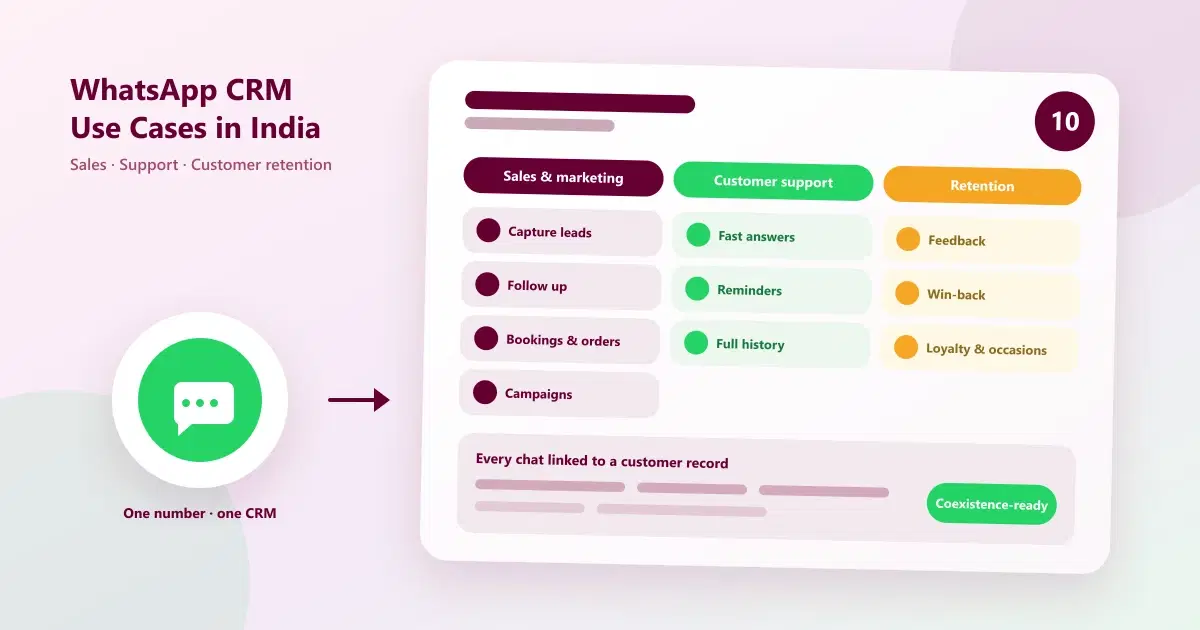
10 WhatsApp CRM use cases for businesses in India across sales, support and customer retention, with examples, metrics and how to start on one number.
Most Indian businesses already use WhatsApp every day. They answer price questions, confirm appointments, send offers and chase payments, all from one phone or several. The question is not whether WhatsApp works for business. It is how much more it can do when every conversation is connected to a customer record, a follow-up and a result.
That is what a WhatsApp CRM adds. This guide covers the ten most useful WhatsApp CRM use cases for WhatsApp CRM for businesses in India, grouped into sales and marketing, customer support and customer retention, with a practical example, and a number to watch, for each. If you want the industry view instead, see our guide to real-life use cases of WhatsApp API across industries.
Quick Answer: What Are the Top WhatsApp CRM Use Cases?
The top WhatsApp CRM use cases for businesses in India fall into three groups: sales and marketing (lead capture, follow-ups, bookings, campaigns), customer support (fast answers, reminders, shared inbox) and customer retention (feedback, win-back, loyalty). A WhatsApp CRM links every chat to a customer record, so each use case has context and a next step.
What Is a WhatsApp CRM?
A WhatsApp CRM, also called WhatsApp customer management software, connects your WhatsApp number to a shared team inbox, customer records, tags and notes, follow-up reminders, automation, campaigns and reports. Instead of conversations living on individual phones, they sit in one place with the customer's history attached. For the basics, read what WhatsApp CRM is and how WhatsApp CRM works.
The 10 WhatsApp CRM Use Cases at a Glance
| # | Use case | Group | Problem it solves | Metric to watch |
|---|---|---|---|---|
| 1 | Capture and qualify new leads | Sales and marketing | Enquiries scattered or lost | Leads captured, first response time |
| 2 | Follow up on enquiries | Sales and marketing | Leads go cold | Follow-up completion rate |
| 3 | Turn chats into bookings and orders | Sales and marketing | Interest never becomes a sale | Enquiry-to-booking rate |
| 4 | Send targeted, opted-in campaigns | Sales and marketing | The same offer goes to everyone | Reply rate, conversions |
| 5 | Answer common questions fast | Customer support | Staff repeat the same answers | First response time |
| 6 | Send reminders and updates | Customer support | No-shows and missed updates | No-show rate |
| 7 | Resolve issues with full history | Customer support | Customers repeat themselves | Resolution time |
| 8 | Collect feedback and reviews | Customer retention | Problems found too late | Feedback response rate |
| 9 | Win back inactive customers | Customer retention | Customers quietly drift away | Reactivation rate |
| 10 | Reward loyal customers and mark occasions | Customer retention | One-time buyers never return | Repeat purchase rate |
WhatsApp CRM for Sales and Marketing (Use Cases 1 to 4)
These use cases turn WhatsApp from a chat tool into a sales channel. For a deeper dive on the sales side, see WhatsApp CRM for sales teams in India.
1. Capture and qualify new leads
The problem: leads arrive through WhatsApp, Instagram, calls and walk-ins, and many are never recorded.
How it works: every message lands in one shared inbox. The team captures the name, need and source, tags the lead, and asks one or two qualifying questions, such as budget, timing or preferred service.
Example: a coaching centre receives admission enquiries on WhatsApp and Instagram. Each is tagged by course and class, so counsellors know which to call first.
Track: leads captured by source, and first response time.
2. Follow up on enquiries so none go cold
The problem: customers ask about a price or offer, then go quiet, and nobody follows up.
How it works: every lead gets a next follow-up date, and reminders tell the owner when it is due. A simple cadence works well: the same day with the details asked for, a day or two later with a nudge, and once more before the offer ends.
Example: a furniture showroom follows up with every customer who asked for a quote, instead of relying on staff memory.
Track: follow-ups completed on time, and enquiry-to-sale rate. This is WhatsApp customer follow-up automation in practice.
3. Turn chats into bookings and orders
The problem: interest is high in the chat, but the customer has to switch apps or call to book.
How it works: the conversation moves directly to a booking or order, with specific slots offered and confirmed in the same chat. Interactive flows can guide the customer through choices.
Example: a salon offers two available slots in the reply, confirms the booking, and sends a reminder.
Track: enquiry-to-booking rate, and time from first message to confirmation.
4. Send targeted, opted-in campaigns
The problem: basic broadcast lists are small, and the same offer goes to every customer.
How it works: customers are grouped by what they bought, how recently, and what they asked about. Opted-in groups receive relevant offers through approved templates, and replies come into the shared inbox where the team can continue the conversation.
Example: a jewellery showroom sends an early-access message about a new collection only to customers who bought in the last year. See also WhatsApp CRM strategies for festive sales.
Track: reply rate, qualified leads, conversions and revenue per campaign. This is WhatsApp CRM for sales and marketing working together.
WhatsApp CRM for Customer Support (Use Cases 5 to 7)
Customers expect quick answers, and WhatsApp is where many ask. These use cases make WhatsApp CRM for customer support faster and more consistent.
5. Answer common questions fast
The problem: staff type the same answers about price, timing and location all day.
How it works: saved replies and automated answers handle routine questions, with an easy path to a person for anything else. Several team members can reply from one number through a shared inbox, with alerts for new messages. See what a WhatsApp shared inbox is.
Example: a clinic automates replies about opening hours and doctor availability, so reception can focus on patients.
Track: first response time, and share of chats resolved without escalation.
6. Send reminders and transactional updates
The problem: customers forget appointments, and staff spend time on reminder calls.
How it works: appointment confirmations, reminders, payment links and invoice messages go out automatically using approved templates, so customers get timely updates without manual effort. Our guide on reducing no-shows with WhatsApp reminders shows the pattern.
Example: a spa sends a reminder the day before and a short thank-you with the invoice after the service.
Track: no-show rate and reminder response rate.
7. Resolve issues with full customer history
The problem: customers repeat their story every time a different person replies.
How it works: conversation history, tags and internal notes stay attached to the customer, so anyone can pick up the case. Role-based access controls who can see what, and managers can review conversations and coach the team.
Example: a customer with a complaint is handed from a receptionist to a manager, who sees the full history and the note about what was promised.
Track: time to resolve, and repeat complaints.
WhatsApp CRM for Customer Retention (Use Cases 8 to 10)
Winning a customer once is expensive in time and effort. These use cases make WhatsApp CRM for customer retention a habit. For a worked example, see salon customer retention and repeat bookings.
8. Collect feedback and reviews
The problem: unhappy customers leave without saying why, and happy ones never post a review.
How it works: a short message a day after the visit or delivery asks how it went. Problems reach the team quickly, and happy customers can be invited to share a review.
Example: a restaurant sends a feedback message after a booking, and a manager follows up personally on low ratings.
Track: feedback response rate, and issues resolved after feedback.
9. Win back inactive customers
The problem: customers who bought once simply stop coming, and nobody notices.
How it works: customers are filtered by last visit or purchase date, and a gentle win-back message goes to those who have been inactive for longer than usual, with a reason to return. Stop after a couple of attempts.
Example: a gym messages members who have not visited for several weeks, offering a free session.
Track: reactivation rate, meaning the share of inactive customers who return.
10. Reward loyal customers and mark occasions
The problem: loyal customers get the same treatment as everyone else, so they have little reason to stay.
How it works: birthday and anniversary messages, early access for regulars, and loyalty rewards keep good customers close. Each message is personal and relevant, and sent only to opted-in customers.
Example: a boutique sends regulars a birthday greeting with a small offer valid for the month.
Track: repeat purchase rate, and revenue from returning customers.
Which Use Cases Matter Most for Your Business?
Every business can use all ten, but each tends to start with a few. The table shows common starting points.
| Business type | Most useful use cases | Why |
|---|---|---|
| Salons, spas and clinics | 3, 6, 9, 10 | Bookings, reminders and rebooking drive revenue |
| Retail and showrooms | 2, 4, 9, 10 | Follow-ups, offers and repeat purchases |
| Education and coaching | 1, 2, 6 | Admission enquiries and reminders |
| Real estate | 1, 2, 7 | Long enquiry cycles need consistent follow-up |
| Local and professional services | 1, 3, 5, 6 | Quotes, scheduling and quick answers |
| Direct-to-consumer brands | 4, 5, 8, 10 | Offers, support and repeat buyers |
For industry-by-industry examples, see real-life use cases of WhatsApp API across industries.
WhatsApp CRM With Coexistence: Keep Your Number
Many businesses hesitate to adopt a CRM because customers already know their WhatsApp number. WhatsApp CRM with Coexistence addresses this. For eligible businesses, Coexistence lets you keep the number and keep using the WhatsApp Business app while the same number is also connected to a CRM platform.
It is worth being precise about the limits. According to Meta's documentation, broadcast lists are disabled in the Business app once the number is connected, and campaigns are sent through the platform. Disappearing and view-once messages are turned off for individual chats, and eligibility depends on your number, app version and provider. We explain this in WhatsApp CRM for small businesses in India and WhatsApp Coexistence explained.
Where to Start: A Simple Rollout Order
Do not switch on all ten at once. A sensible order:
| Phase | Use cases | Why first |
|---|---|---|
| Start here | 1 (capture), 5 (fast answers), 2 (follow-ups) | Fixes missed messages and forgotten leads |
| Then add | 3 (bookings), 6 (reminders), 7 (history) | Turns conversations into sales and cuts no-shows |
| Later | 4 (campaigns), 8 to 10 (retention) | Needs clean customer records first |
WhatsApp Rules Every Use Case Must Follow
- Get opt-in. Message customers who have agreed to hear from you, and make it easy to opt out.
- Use approved templates. Business-initiated messages outside the 24-hour customer service window generally need an approved template.
- Do not over-message. Too many promotions lead to blocks and lower quality ratings.
- Know the costs. Meta charges for template messages separately from your software subscription, and rates can change, so check the current rates.
- Use official access. Connect through the WhatsApp Business Platform or a provider built on it, not unofficial tools that put your number at risk.
Metrics to Track for Each Use Case
Pick one or two numbers per use case and review them monthly. Common ones: first response time, follow-up completion rate, enquiry-to-booking rate, reply rate on campaigns, no-show rate, resolution time, reactivation rate and repeat purchase rate. Our guide to WhatsApp marketing metrics gives the formulas.
Common Mistakes to Avoid
- Trying everything at once. Start with two or three use cases and add more.
- Skipping customer records. Campaigns and retention depend on clean data.
- Messaging without opt-in. It risks blocks and a poor quality rating.
- Sending one offer to everyone. Use customer groups.
- Over-automating. Customers should always be able to reach a person.
- Assuming every app feature continues with Coexistence. Check what changes.
- Not measuring. Track at least one number per use case.
How Cleomitra Supports These Use Cases
Cleomitra is a WhatsApp-led CRM for customer-facing businesses. Based on what the product offers:
- Shared inbox: all customer messages are captured in one team inbox, with instant alerts, customer history, tags, templates and internal notes. See the WhatsApp platform page.
- Leads and follow-ups: capture leads from WhatsApp, Instagram DMs, calls and email, import contacts, and use a follow-up manager with automated reminders. See the Contacts and Follow-ups page.
- Bookings and conversions: WhatsApp Flows for booking and ordering, and, with Service OS, appointments, POS with GST invoices and more.
- Campaigns: targeted campaigns for specific customer groups, subject to WhatsApp and Meta policies and messaging limits.
- Support and automation: automated replies to common questions with Mitra AI, role-based access and multi-user access.
- Retention: automated follow-ups, win-back messages, birthday messages and loyalty rewards. See the customer retention page.
- Coexistence: for eligible businesses, keep your existing number and contacts. See the WhatsApp Coexistence page. Broadcast lists move to the platform, as explained above.
- Reports: review metrics such as messages sent, responses, booking conversions and campaign performance.
Plan details, based on the current Cleomitra pricing:
- Engage Starter (₹999/month) includes a basic shared inbox, manual campaigns and one ready-made Autopilot flow, but no CRM.
- Engage Growth (₹1,499/month) adds the CRM with the shared inbox, an unlimited flow builder, scheduled and recurring campaigns, and reports and insights.
- Engage Pro (₹2,499/month) adds unlimited pipelines and flows, and includes Instagram and email.
- Service OS Growth (₹2,799/month) and Service OS Pro (₹3,999/month) add appointments and booking, billing and more for service businesses.
Meta's WhatsApp message charges are separate from the subscription. Check the pricing page for exactly what each plan includes. To compare tools, see top 10 WhatsApp CRM software in India.
Related Guides
- Top 10 WhatsApp CRM Software in India (2026): Pricing
- What Is WhatsApp CRM?
- How Does WhatsApp CRM Work? From First Message to Repeat Customer
- WhatsApp CRM for Sales Teams in India (2026)
- WhatsApp CRM for Small Businesses in India (2026): Keep Your Number, Scale Campaigns
- Real-Life Use Cases of WhatsApp API Across Industries
Ready to Put WhatsApp CRM to Work in Your Business?
See how Cleomitra can bring your sales, support and retention conversations into one platform, on the number your customers already know.
Frequently Asked Questions
What are the main WhatsApp CRM use cases for businesses in India?
The main WhatsApp CRM use cases are capturing leads, following up on enquiries, turning chats into bookings and orders, sending targeted campaigns, answering common questions, sending reminders, resolving issues with full history, collecting feedback, winning back inactive customers, and rewarding loyal customers. They fall into sales, support and retention.
How can businesses in India use WhatsApp CRM for customer support?
Use a shared inbox so several people reply from one number, add saved replies and automated answers for common questions, and keep customer history and internal notes on every chat. Send appointment reminders and updates with approved templates, and use role-based access so managers can review conversations and coach the team.
How does WhatsApp CRM help sales and marketing?
It captures every enquiry in one place, tracks follow-ups with reminders, and moves chats to bookings or orders. For marketing, it groups customers by purchase history and sends relevant, opted-in campaigns using approved templates, then shows replies, leads and conversions so you can see which offers worked.
How does WhatsApp CRM improve customer retention?
It keeps customer history, so follow-ups are timely and personal. Businesses use it to send thank-you and feedback messages, win back customers who have gone quiet, and reward loyal customers with birthday messages and offers. Tracking repeat purchase and reactivation rates shows whether retention is improving.
Can I use WhatsApp CRM with Coexistence?
Often yes. WhatsApp Coexistence lets eligible businesses keep their number and the WhatsApp Business app while connecting to a CRM. Eligibility depends on Meta's rules and your provider, and some app features change, such as broadcast lists moving to the platform. Confirm the details before you connect.
Which WhatsApp CRM use case should I start with?
Start with the basics that stop revenue leaking: capture every enquiry in one shared inbox, answer common questions quickly, and set follow-up reminders. Add bookings, reminders and customer history next, then targeted campaigns and retention once your customer records are clean. Starting small makes the system easier for your team to adopt.
Which businesses benefit most from WhatsApp customer management software?
Any business that talks to customers on WhatsApp can benefit, especially salons, clinics, retail shops, education centres, real estate teams and local service businesses. Very high-volume online stores should also compare tools built for catalogue and order management. Choose by how your customers actually contact and buy from you.
How much does a WhatsApp CRM cost in India?
There are two parts: the platform subscription, usually priced in rupees per month, and Meta's WhatsApp message charges, which are separate and can change. At Cleomitra, plans start at ₹999 per month, and the CRM with the shared inbox starts at ₹1,499. Compare what each plan includes before choosing.
