
Top 10 Features to Look for in WhatsApp Marketing Software in India (2026)
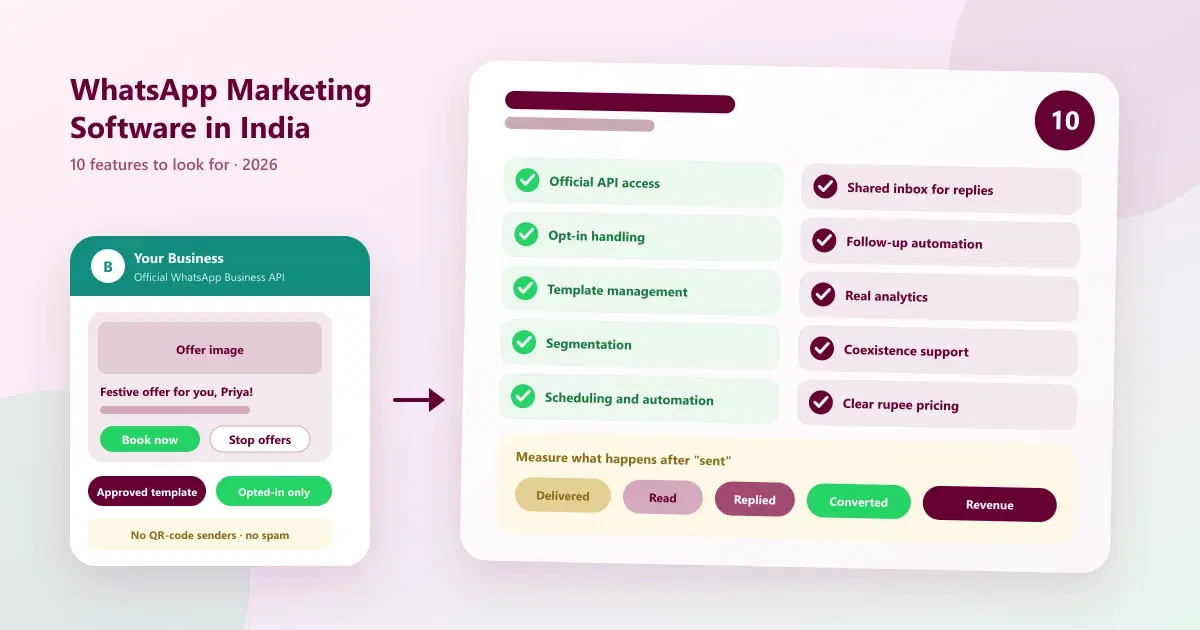
10 features to look for in WhatsApp marketing software in India: official API, opt-in, templates, segmentation, automation, analytics and pricing.
Every week, another tool promises "unlimited WhatsApp bulk messaging for a few hundred rupees". Some are official platforms with real campaign features. Others scan a QR code, send from a personal number, and leave you with a banned account a month later. For a business, choosing between them is not a small decision: your WhatsApp number is your customer line, and losing it hurts.
This guide is a buyer's checklist for WhatsApp marketing software in India. It lists the ten features that matter, the questions to ask each vendor, the red flags to avoid, and how pricing really works, so you can compare tools on what they actually do. If you want a ranked list of vendors, see our top 10 WhatsApp CRM software in India. This guide is about how to judge any of them.
Quick Answer: Which Features Matter Most in WhatsApp Marketing Software in India?
Look for official WhatsApp Business API access, opt-in and consent handling, template management, audience segmentation, scheduled and automated campaigns, a shared inbox for replies, follow-up automation, analytics beyond messages sent, existing-number support through Coexistence, and pricing that separates the software fee from Meta's message charges.
What Is WhatsApp Marketing Software?
WhatsApp marketing software, also called WhatsApp campaign software, is a platform that lets a business send planned messages, such as offers, updates, reminders and announcements, to customers on WhatsApp, and manage the replies. Many people search for it as WhatsApp bulk messaging software, but the word "bulk" needs care. Done properly, it means sending approved template messages at scale to customers who have opted in, through the official WhatsApp Business Platform. Done badly, it means spamming contacts through unofficial tools, which can get your number restricted or banned.
The best tools go beyond sending. They combine campaigns with a shared inbox, customer records and follow-ups, which is what a WhatsApp CRM adds. For background, see what WhatsApp CRM is and what the WhatsApp Business API is.
Types of WhatsApp Marketing Software in India
| Type | How it works | Main risk or limit | Best for |
|---|---|---|---|
| Unofficial bulk senders | Connect a personal or business number by scanning a QR code and send in bulk | Breaks WhatsApp's rules, so numbers can be restricted or banned | Nobody who depends on their number |
| Official API broadcast tools | Send approved templates through the WhatsApp Business Platform | Often limited to sending, with little customer management | Simple, one-way announcements |
| WhatsApp CRM platforms with campaigns | Combine API campaigns with a shared inbox, records and follow-ups | More to set up, and plans cost more than a simple sender | Businesses that want sales and follow-up in one place |
| Enterprise messaging platforms | Large-scale messaging infrastructure with custom integrations | Complex and expensive for small teams | Large enterprises with developer teams |
For the risks of unofficial tools, see how to prevent your WhatsApp Business API number from getting banned.
The 10 Features at a Glance
| # | Feature | Why it matters | Question to ask |
|---|---|---|---|
| 1 | Official WhatsApp Business API access | Protects your number and keeps you within the rules | "Do you use the official WhatsApp Business Platform?" |
| 2 | Opt-in and consent handling | Keeps campaigns compliant and replies high | "How do you record and respect opt-in and opt-out?" |
| 3 | Template management | Business-initiated messages need approved templates | "Can I create, submit and track templates here?" |
| 4 | Segmentation and contact management | Relevant offers beat one message for everyone | "How do I tag, import and filter contacts?" |
| 5 | Scheduling and automation | Campaigns go out at the right time without manual work | "Can I schedule and automate recurring campaigns?" |
| 6 | Shared inbox for replies | Replies are where the sale happens | "Can my team reply together from one number?" |
| 7 | Follow-up automation | People who reply or ignore need a next step | "Can I automate follow-ups with a human handover?" |
| 8 | Analytics beyond sent counts | Shows replies, conversions and revenue | "Can I see which campaign produced which sale?" |
| 9 | Existing-number support | You keep the number customers know | "Do you support WhatsApp Coexistence, and what changes?" |
| 10 | Transparent pricing, limits and support | No surprise costs or caps | "What will I pay in total, in rupees?" |
Top 10 Features to Look for in WhatsApp Marketing Software
1. Official WhatsApp Business API access
Why it matters: campaigns sent through the official WhatsApp Business Platform follow WhatsApp's rules. Tools that use unofficial methods put your number at risk. WhatsApp Business API software built on the official platform is the safe foundation for everything else on this list.
What to look for: a clear statement that the tool connects through the official platform, a Meta-approved provider or Tech Provider setup, and a verified business profile flow.
Ask the vendor: "Is my number connected through the official WhatsApp Business Platform?" If the answer involves scanning a QR code, be cautious.
2. Opt-in and consent management
Why it matters: WhatsApp expects businesses to message people who have agreed to hear from them. Messaging contacts without consent leads to blocks, reports and lower quality ratings.
What to look for: a way to record how and when each contact opted in, easy opt-out handling, and separate lists or tags for opted-in contacts.
Ask the vendor: "How do you help me collect and respect opt-in and opt-out?"
3. Template creation and approval management
Why it matters: business-initiated messages outside the 24-hour customer service window generally need an approved template. Poor template handling slows every campaign.
What to look for: a template builder with marketing and utility categories, support for images and buttons, submission to Meta for approval, and visibility of the approval status.
Ask the vendor: "Can I create templates and track approval inside the platform?"
4. Segmentation and contact management
Why it matters: a single offer to every contact is the fastest way to lose opted-in customers. Targeting by interest, purchase or recency lifts replies.
What to look for: bulk contact import with field mapping, tags by behaviour or interest, filters such as last visit or purchase, and automatic tagging from interactions. A CRM behind the campaigns keeps these segments accurate.
Ask the vendor: "How do I build a segment of customers who bought in the last 90 days?"
5. Scheduling, recurring campaigns and automation
Why it matters: campaigns should go out at the right time without someone clicking send. Recurring messages, such as reminders and renewal nudges, save hours.
What to look for: scheduled and recurring campaigns, triggers based on customer behaviour or dates, and sensible sending limits.
Ask the vendor: "Can I schedule campaigns in advance and run recurring ones?" Note that some entry-level plans only allow manual sends.
6. A shared inbox for campaign replies
Why it matters: the campaign is the start of a conversation. If replies land on one person's phone, they are missed, and the campaign's money is wasted.
What to look for: a team inbox with alerts, notes, tags and role-based access, so several people can reply from one number. See what a WhatsApp shared inbox is.
Ask the vendor: "Where do campaign replies go, and who can see them?"
7. Follow-up automation and lead nurturing
Why it matters: most customers need more than one message. A good tool follows up with people who replied, and with those who did not, on a sensible schedule.
What to look for: automated follow-ups or a flow builder, reminders for the team, easy handover to a person, and stop rules so customers are not over-messaged.
Ask the vendor: "Can I set an automated follow-up that stops when the customer replies?"
8. Analytics beyond messages sent
Why it matters: "10,000 messages sent" tells you nothing about sales. You need to know what happened next.
What to look for: delivery and read status, replies, click-through, conversion tracking, and, ideally, revenue attributed to each campaign. Our guide to WhatsApp marketing metrics explains the formulas.
Ask the vendor: "Can I see which campaign produced which bookings or sales?"
9. Existing-number support through WhatsApp Coexistence
Why it matters: many businesses will not switch numbers, and should not have to. WhatsApp Coexistence lets eligible businesses keep their number and the WhatsApp Business app while the number is connected to a platform.
What to look for: support for Coexistence, clear eligibility information, and an honest explanation of what changes. See the section below.
Ask the vendor: "Can I connect my existing number, and which app features will stop working?"
10. Transparent pricing, limits and support
Why it matters: two tools with the same features can cost very different amounts once Meta's charges, limits and add-ons are included.
What to look for: a rupee price for each plan, clarity on Meta's message charges, limits on customers, users and numbers, API and integration access, and real onboarding support.
Ask the vendor: "What will I pay in total for my expected volume, in rupees, including add-ons?"
Red Flags to Avoid
| Red flag | Why it matters |
|---|---|
| "Scan a QR code to start bulk sending" | It suggests an unofficial method that risks a ban |
| "Unlimited free messages" | Official template messages carry Meta charges, so "free unlimited" usually means a shortcut |
| No mention of opt-in or templates | The tool ignores the rules that protect your number |
| No answer about Meta's charges | You may face unexpected costs or hidden markups |
| No shared inbox or reply handling | Campaign replies will be missed |
| Reports show only "sent" | You cannot tell whether campaigns produce sales |
| Pressure to import every contact | Messaging people who never opted in leads to blocks |
How WhatsApp Marketing Software in India Is Priced
There are two separate costs, and mixing them up is the most common budgeting mistake:
- The software subscription. Usually priced in rupees per month, and often tiered by features, customers or users.
- Meta's message charges. Meta charges for template messages, with rates that depend on the message category and country. They are separate from the subscription and can change, so check Meta's current rates before planning a large campaign.
Ask every vendor for a total monthly estimate for your expected volume, and check whether the vendor adds a markup to Meta's charges. For more on costs, see sending bulk messages from your existing WhatsApp number.
WhatsApp Coexistence: What Changes for Campaigns
Coexistence is useful, but it is worth being precise. According to Meta's documentation, once an eligible Business app number is connected, broadcast lists in the app are disabled, and existing lists become read-only. Campaigns are sent through the connected platform instead. Disappearing and view-once messages are turned off for individual chats, and eligibility depends on your number, app version and provider. For the details, see WhatsApp CRM for small businesses in India and WhatsApp Coexistence explained.
How to Test a Tool Before You Buy
- Write down your top three goals. For example, more repeat bookings, faster replies, and clear campaign reports.
- Ask the ten questions above and note which answers are specific.
- Run a small real campaign. Send one approved template to a small opted-in group.
- Check where replies land. Make sure your team can answer them quickly.
- Review the report. You should see delivery, replies and conversions, not just sent counts.
- Add up the real cost. Include Meta's charges and any add-ons.
WhatsApp Rules Your Software Must Respect
- Opt-in. Message customers who have agreed to hear from you, and make it easy to opt out.
- Approved templates. Business-initiated messages outside the 24-hour customer service window generally need an approved template.
- Quality and limits. WhatsApp applies messaging limits and quality ratings, so avoid sending too often or to uninterested contacts.
- Official access. Use the official platform or a provider built on it.
Common Buying Mistakes
- Choosing on price alone. The cheapest sender is often the most likely to get you banned.
- Buying a sender, not a system. Without a shared inbox and records, replies and follow-ups are lost.
- Ignoring Meta's charges. Budget for both the subscription and the message charges.
- Importing every contact. Build your campaigns around opted-in customers.
- Assuming Coexistence changes nothing. Check which app features stop working.
- Not testing first. Run a small campaign before you commit.
How Cleomitra Maps to the 10 Features
Cleomitra is a WhatsApp-led CRM with campaigns built in. Based on what the product describes:
| Feature | What Cleomitra offers |
|---|---|
| 1. Official API | Campaigns are sent through the official WhatsApp API |
| 2. Opt-in | Campaigns go to opted-in customers, subject to WhatsApp and Meta policies and messaging limits |
| 3. Templates | Utility and marketing templates, with images and buttons |
| 4. Segmentation | Tags by behaviour or service interest, bulk tag imports, auto-tagging, bulk contact import and instant segments |
| 5. Scheduling and automation | Manual campaigns on Engage Starter, and scheduled and recurring campaigns from Engage Growth |
| 6. Shared inbox | A shared team inbox with alerts, tags and internal notes, and role-based access |
| 7. Follow-ups | Automated follow-ups, an unlimited flow builder from Engage Growth, and a follow-up manager with reminders |
| 8. Analytics | Read-status visibility, open and click-through rates, conversion tracking and campaign performance reports |
| 9. Coexistence | For eligible businesses, keep your existing number, with broadcast lists moving to the platform |
| 10. Pricing | Plans priced in rupees, with Meta's message charges separate |
Product pages worth reading: the Campaigns page, the WhatsApp platform page and the WhatsApp Coexistence page. Plan details, based on the current Cleomitra pricing:
- Engage Starter (₹999/month) includes a basic shared inbox, manual campaigns and one ready-made Autopilot flow, but no CRM.
- Engage Growth (₹1,499/month) adds the CRM with the shared inbox, an unlimited flow builder, scheduled and recurring campaigns, reports and insights, and developer and API access.
- Engage Pro (₹2,499/month) adds unlimited pipelines and flows, and includes Instagram and email.
- Service OS Growth (₹2,799/month) and Service OS Pro (₹3,999/month) add appointments and booking, billing and more for service businesses.
Meta's WhatsApp message charges are separate from the subscription. Cleomitra suits businesses that want campaigns, a shared inbox and follow-ups together. If you run a very high-volume online store that needs deep catalogue and order tooling, compare specialised tools as well. Check the pricing page for exactly what each plan includes.
Related Guides
- Top 10 WhatsApp CRM Software in India (2026): Pricing
- Top 10 WhatsApp Business API Features Every Growing Business Should Look for in 2026
- Is It Possible to Send Bulk Messages from Your Existing WhatsApp Number?
- Top 10 WhatsApp Marketing Metrics Every Business Should Track in 2026
- WhatsApp CRM for Small Businesses in India (2026): Keep Your Number, Scale Campaigns
- Top 10 WhatsApp CRM Use Cases for Businesses in India (2026)
Ready to Compare WhatsApp Marketing Software the Smart Way?
See how Cleomitra handles campaigns, replies and follow-ups on one platform, and bring your ten questions.
Frequently Asked Questions
What is WhatsApp marketing software?
WhatsApp marketing software is a platform that lets a business send planned messages such as offers, updates and reminders to customers on WhatsApp, and manage the replies. The best tools use the official WhatsApp Business Platform and combine campaigns with a shared inbox, customer records, follow-ups and analytics.
What features should I look for in WhatsApp marketing software in India?
Look for official WhatsApp Business API access, opt-in handling, template management, segmentation, scheduled and automated campaigns, a shared inbox for replies, follow-up automation, analytics beyond sent counts, existing-number support through Coexistence, and rupee pricing that separates the software fee from Meta's message charges.
Is WhatsApp bulk messaging software allowed?
Bulk messaging through the official WhatsApp Business Platform is allowed when you message opted-in customers using approved templates. Unsolicited or spam-style messaging, and tools that use unofficial methods such as QR-code senders, can break WhatsApp's rules and lead to restricted or banned numbers. Check WhatsApp's current policies.
What is the difference between WhatsApp marketing software and a WhatsApp CRM?
WhatsApp marketing software focuses on sending campaigns. A WhatsApp CRM adds the customer record behind them: shared inbox, history, tags, follow-ups and reports. Many businesses prefer a CRM with campaigns built in, because replies and follow-ups are where campaigns turn into sales.
Can I use WhatsApp marketing software with my existing number?
Often yes. WhatsApp Coexistence lets eligible businesses keep their number and the WhatsApp Business app while connecting to a platform. Eligibility depends on Meta's rules and your provider, and some app features change, such as broadcast lists being disabled in the app and campaigns moving to the platform.
How much does WhatsApp marketing software cost in India?
There are two parts: the platform subscription, usually priced in rupees per month, and Meta's message charges for templates, which are separate and can change. At Cleomitra, plans start at ₹999 per month, and scheduled campaigns with the CRM start at ₹1,499. Ask any vendor for a total estimate.
Why do some WhatsApp bulk sender tools get numbers banned?
Many cheap tools connect through unofficial methods, such as scanning a QR code, and send messages to contacts who never opted in. This breaks WhatsApp's rules and can trigger blocks, reports and restrictions. Official platforms use approved templates, opt-in and quality limits, which protect your number.
What should I ask before buying WhatsApp campaign software?
Ask whether it uses the official platform, how it handles opt-in and templates, how you segment contacts, whether campaigns can be scheduled, where replies go, what the reports show, whether Coexistence is supported and what changes, and what the total monthly cost is in rupees including Meta's charges.
