
How to Manage Salon Enquiries from WhatsApp, Instagram & Calls Without Losing Bookings
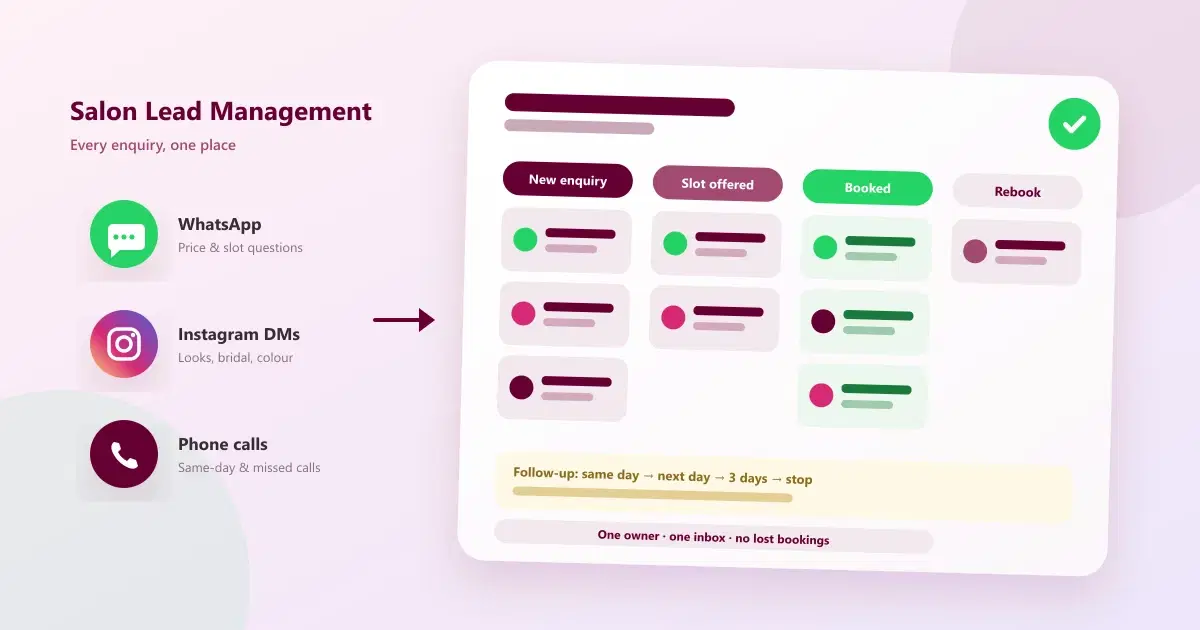
Salon lead management made simple: how to capture, reply to and follow up on WhatsApp, Instagram and call enquiries in one place, so you stop losing bookings.
It is a Saturday afternoon. Two stylists are with clients, the receptionist is on a call, and your phone buzzes with a WhatsApp message asking for a bridal trial. Ten minutes later an Instagram DM asks for a hair-spa price. A missed call from an unknown number sits on the screen. Three enquiries, three channels, and nobody has replied to any of them yet.
This is where most salons quietly lose bookings. The service is good and the demand is there, but the enquiries are scattered. Salon lead management is the habit and the system that make sure every enquiry gets an owner, a quick reply, and a follow-up until it becomes an appointment. This guide shows how to build it for WhatsApp, Instagram and calls.
Quick Answer: How Do You Manage Salon Enquiries Without Losing Bookings?
Good salon lead management means collecting WhatsApp, Instagram and phone enquiries in one place, replying fast, recording what the customer wants, offering a booking slot, and following up on a schedule. Give every enquiry one owner, tag its status, and review unconverted leads weekly.
What Is Salon Lead Management?
Salon lead management is the process of capturing every person who shows interest in your services, tracking where they are in the booking journey, and following up until they book, decline, or go cold. A "lead" is anyone who asks about a service, a price, an offer, or an available slot, whether by message, DM, call, or walk-in.
It covers four jobs:
- Capture: note every enquiry, with the person's name, number, service interest, and source.
- Respond: reply quickly with the right information.
- Convert: turn the conversation into a confirmed appointment.
- Follow up: reach out to people who did not book yet, and bring booked customers back for the next visit.
For the wider picture of running a salon on a CRM, see our complete guide to CRM for salons in India.
Why Salons Lose Bookings From Enquiries
Most lost bookings are not caused by price or quality. They come from the handling of the enquiry itself:
- Slow replies. Staff are busy with clients, so messages wait. The customer messages another salon in the meantime.
- Enquiries spread across channels. WhatsApp on one phone, Instagram on another, calls on a third, and nobody sees the full picture.
- No owner. When everyone can reply, often nobody does.
- Missed calls with no callback. A call that rings out while the team is with clients is easy to forget.
- Price-only conversations that end. The customer asks the price, gets a number, and the chat goes silent with no follow-up.
- No record. The next person does not know what was already discussed, so the customer is asked the same questions again.
- No follow-up after the first reply. One reply is treated as the end, even if the customer has not booked.
The same pattern shows up in other businesses, and we cover it in top 10 reasons leads are not converting into customers and top 10 problems managing leads on WhatsApp.
Where Salon Enquiries Come From
Each channel loses bookings in a different way, so each needs its own habit:
| Channel | Typical enquiry | Where bookings leak | Fix |
|---|---|---|---|
| Price, availability, "can I come today?" | Slow or forgotten replies on a shared phone | One shared inbox with an owner per chat | |
| Instagram DMs | "Price for this look?", bridal and colour enquiries | DMs sit unseen in a separate app | Bring DMs into the same inbox, then move to a booking |
| Phone calls | Same-day slots, rescheduling, price | Missed calls while staff are with clients | Log every call and call back or message missed callers |
| Walk-ins and referrals | "Do you have a slot now?" | Details never recorded | Capture name and number at the desk |
| Website, Google and ads | Form fills, "call now" taps | Slow first response | Route them into the same list and reply fast |
The 7-Step Salon Lead Management System
You do not need a complicated setup. This sequence works for a single-chair studio and scales to a multi-branch salon.
Step 1: List every channel enquiries arrive on
Write down every number, account, and form that customers use: the business WhatsApp number, Instagram DMs, the salon landing number, Google profile calls, and walk-ins. You cannot manage what you have not listed.
Step 2: Bring everything into one place
Decide where the single source of truth lives, whether a CRM, a shared inbox, or at minimum a shared sheet. The goal is that anyone on the team can open one view and see every open enquiry. A WhatsApp shared inbox is a good starting point because it removes the shared-phone problem first.
Step 3: Capture the same details every time
For each enquiry, record the same five items: name, phone number, service of interest, preferred date or time, and source (WhatsApp, Instagram, call, walk-in). Consistent capture is what makes follow-up and reporting possible later.
Step 4: Set a reply-time target
Pick a target your team can actually meet, for example replying to every new enquiry within a few minutes during working hours. Use quick replies for common questions, and an away message for after-hours so no one is left waiting without a response.
Step 5: Give every enquiry one owner
Whoever replies first, or whoever is on enquiry duty that shift, owns the conversation until it ends in a booking or a decision. Agree this rule with the team in one line and write it down.
Step 6: Move the conversation to a booking
Do not stop at the price. After answering, offer two specific slots, such as "We have 4 pm today or 11 am tomorrow, which suits you?". Then confirm the booking in writing, and send a reminder before the visit. Our guide on reducing no-shows with WhatsApp reminders covers that last step.
Step 7: Follow up on a schedule
For enquiries that have not booked, follow up at set intervals and then stop politely. After the visit, a short thank-you and a rebooking message turns a one-time lead into a repeat customer. See how salons can automate offers and customer follow-ups for ideas.
A Simple Salon Lead Pipeline
Tagging every enquiry with a stage lets you see at a glance what needs attention. Here is a pipeline that fits most salons:
| Stage | What it means | Next action | Goal |
|---|---|---|---|
| New enquiry | First message, DM, or call received | Reply and capture details | First reply sent |
| Replied | Customer has your answer | Offer two slots | Customer picks a time |
| Slot offered | Waiting for a decision | Follow up if no response | Booking confirmed |
| Booked | Appointment confirmed | Send a reminder | Customer arrives |
| Visited | Service completed | Thank-you and feedback request | Happy customer |
| Rebooking due | Time for the next visit | Send a rebooking message | Repeat booking |
| Cold or lost | No response after follow-ups | Add to a later offer list | Reactivate during a campaign |
Keep stage names few and consistent. For more on tags and statuses, read how to organize WhatsApp customers.
Channel Playbook: WhatsApp, Instagram and Calls
Managing salon enquiries on WhatsApp
- Use a business number that the whole team can reply from, not one personal phone.
- Save quick replies for your most common questions: service list, price range, opening hours, and location.
- Ask for the service and preferred time in the first reply, so the conversation moves toward a booking.
- Tag the chat with a stage, such as "slot offered", so nothing is forgotten.
- Use approved templates for follow-ups sent outside the 24-hour customer service window, and message only customers who have opted in.
Sample reply: "Hi Priya, thank you for contacting us. A keratin treatment starts at the price in our menu, depending on hair length. We have a slot at 4 pm today or 11 am tomorrow. Which works for you?"
Managing salon enquiries on Instagram
- Treat DMs like any other lead: reply quickly, capture the details, and give the conversation an owner.
- Answer the question the customer asked first, then guide them to a booking instead of a long back and forth.
- Tag DMs by service interest, such as bridal, colour, or skin, so you can follow up with relevant offers.
- Keep story and reel replies short, and keep your menu easy to find so common questions are answered quickly.
Sample reply: "Thank you for your message! That colour is possible. To quote correctly, could you share your hair length? We can also book a free consultation this week."
Managing salon enquiries from phone calls
- Log every call, even short ones, with the caller's name, number, and what they wanted.
- Call back missed calls as soon as a stylist is free, or send a message explaining you will call shortly.
- If your system supports it, recognise returning customers by number so you can greet them with context.
- Inform callers if calls are recorded, and follow the rules that apply to your business.
Sample message after a missed call: "Hi, this is Glow Studio. We missed your call and are happy to help. Would you like a callback, or shall we book a slot here on WhatsApp?"
For a deeper look at the missed-call problem, see how to automate follow-ups after a missed call using IVR and WhatsApp.
Follow-Up Timing That Wins Bookings Back
Customers rarely say no. More often they get busy and forget. A simple, polite sequence brings many of them back. Treat the timings below as a starting point and adjust them to your salon.
| When | Message idea |
|---|---|
| Same day, a few hours later | A friendly reminder with the slots offered |
| Next day | A short nudge, plus one helpful detail such as a service benefit or a photo |
| After 3 days | A gentle check-in, or a limited-time offer if you run one |
| After 7 days | A final polite message, then stop |
| After the visit | Thank-you, feedback request, and rebooking prompt |
Do not over-message. Two or three well-timed follow-ups are enough, and any customer who asks to stop should be removed from the list.
Metrics to Track for Salon Lead Management
- First response time: how long a new enquiry waits for a reply.
- Enquiry-to-booking rate: bookings made divided by enquiries received.
- Missed-call callback rate: the share of missed calls that got a callback or message.
- Bookings by source: which channel (WhatsApp, Instagram, calls, walk-ins) produces the most appointments.
- No-show rate: booked appointments where the customer did not arrive.
- Repeat-visit rate: how many customers book again after the first visit.
Review these weekly. A rising first-response time or a falling enquiry-to-booking rate is an early warning that enquiries are slipping through.
Common Mistakes to Avoid
- Keeping leads in someone's memory or a personal phone. When that person is off, the leads stop moving.
- Only answering the price question. A price with no next step often ends the conversation.
- Ignoring Instagram DMs. They are leads just like WhatsApp messages.
- Letting missed calls go unanswered. A quick message can save the booking.
- Using different tags for the same thing. "Bridal", "bride", and "wedding" should be one tag.
- Messaging without opt-in. It can lead to blocks and a poor customer experience.
Notebook and Spreadsheet vs a Salon CRM
Many salons start with a notebook, a spreadsheet, or WhatsApp labels. That works at small scale, but it gets harder as enquiries grow.
| Need | Notebook or spreadsheet | Salon CRM |
|---|---|---|
| Capturing enquiries from all channels | Manual entry, easily skipped | Conversations and calls kept in one place |
| Knowing who owns a chat | Depends on memory | Assigned and visible to the team |
| Follow-up reminders | Easy to forget | Tags, statuses, and automated follow-ups |
| Customer history | Scattered across notes | Visits, notes, and tags in one profile |
| Booking from an enquiry | Switch between apps | Book directly from the conversation where supported |
| Reporting | Manual counting | Reports on conversations and bookings |
If this table feels familiar, you may be ready to move on. We list the signs in top 10 signs your business has outgrown WhatsApp and Excel.
How Cleomitra Helps Salons Manage Enquiries
Cleomitra brings the channels in this guide into one workspace. Based on what the product offers:
- WhatsApp shared inbox: your team replies from a shared inbox with full conversation history, tags, and internal notes, without sharing a personal number. See the WhatsApp platform page.
- Instagram inbox: manage Instagram DMs alongside WhatsApp, with customer context, labels and tags, and saved replies. Where booking is enabled, you can check staff availability and create a booking from inside the chat. See the Instagram platform page.
- Calls: incoming and outgoing calls with caller identification, call logs, call recording, missed-call alerts, and multi-user calling, so missed callers can be followed up. See the Calls platform page.
- Appointments and follow-ups: confirmations and reminders for bookings, and campaigns or follow-ups to bring customers back.
Plan details, based on the current Cleomitra pricing:
- Engage Starter (₹999/month) includes a basic shared inbox, and Engage Growth (₹1,499/month) adds the CRM with the shared inbox.
- Instagram and email are included in Engage Pro (₹2,499/month) and available as a ₹499/month add-on on Growth plans.
- Appointments and Booking, POS with GST invoices, services and products, and inventory come with Service OS Growth (₹2,799/month) and Service OS Pro (₹3,999/month).
Check the pricing page for exactly what each plan includes before you choose. To see how it fits a salon, visit the salon and spa solution page.
Related Guides
- How WhatsApp Automation Helps Salons Book More Appointments
- How to Reduce Salon and Clinic No-Shows With WhatsApp Reminders
- What Is a WhatsApp Shared Inbox?
- How Salons Can Automate Offers and Customer Follow-Ups
- Top 10 Best Salon Management Software in India (2026)
Ready to Stop Losing Salon Bookings?
See how Cleomitra can bring your WhatsApp, Instagram and call enquiries into one place for your team.
Frequently Asked Questions
What is salon lead management?
Salon lead management is the process of capturing every enquiry about your services, tracking its status, and following up until it becomes a booking. It covers WhatsApp messages, Instagram DMs, calls, and walk-ins, and gives each enquiry an owner, a stage, and a next action so that none are forgotten.
How do I manage salon enquiries from WhatsApp, Instagram and calls?
Bring all three channels into one place, record the same details for each enquiry, and assign one owner per conversation. Reply within a target time, offer two booking slots, and follow up on a schedule. Log missed calls and call back or message those callers the same day.
How fast should a salon reply to an enquiry?
As fast as your team can reliably manage, ideally within a few minutes during working hours. There is no single official figure, so set a target you can meet and measure it. Use quick replies and an after-hours message so customers are never left without a response.
What should a salon do about missed calls?
Log every missed call and respond the same day. Call back when a stylist is free, or send a short message offering a callback or a WhatsApp booking. Missed callers are often ready to book, so a quick reply can recover appointments that would otherwise go to another salon.
Can I turn Instagram DMs into salon bookings?
Yes. Treat DMs as leads: reply quickly, ask for the service and preferred time, and offer specific slots. Tools that bring Instagram into a shared inbox let your team handle DMs with customer context and, where booking is enabled, create the appointment from the conversation.
How many times should I follow up with a salon lead?
Two or three polite follow-ups are usually enough: later the same day, the next day, and around three to seven days later. After that, stop and add the customer to a future offer list. Always respect customers who ask not to be messaged, and message only those who opted in.
Do I need a CRM for salon lead management?
Not at the start. A notebook or spreadsheet works for a handful of enquiries. A salon CRM becomes useful when several people reply, enquiries arrive on multiple channels, or follow-ups are being missed. It keeps history, owners, tags, and bookings together so nothing depends on memory.
How can I track where my salon bookings come from?
Record the source of every enquiry, such as WhatsApp, Instagram, call, or walk-in, and note whether it became a booking. Then compare bookings by source each week. Over time this shows which channel brings the most appointments and where enquiries are leaking.
