
Top 10 WhatsApp CRM Strategies for Retail Businesses in India (2026): Customer Enquiries, Campaigns & Repeat Sales
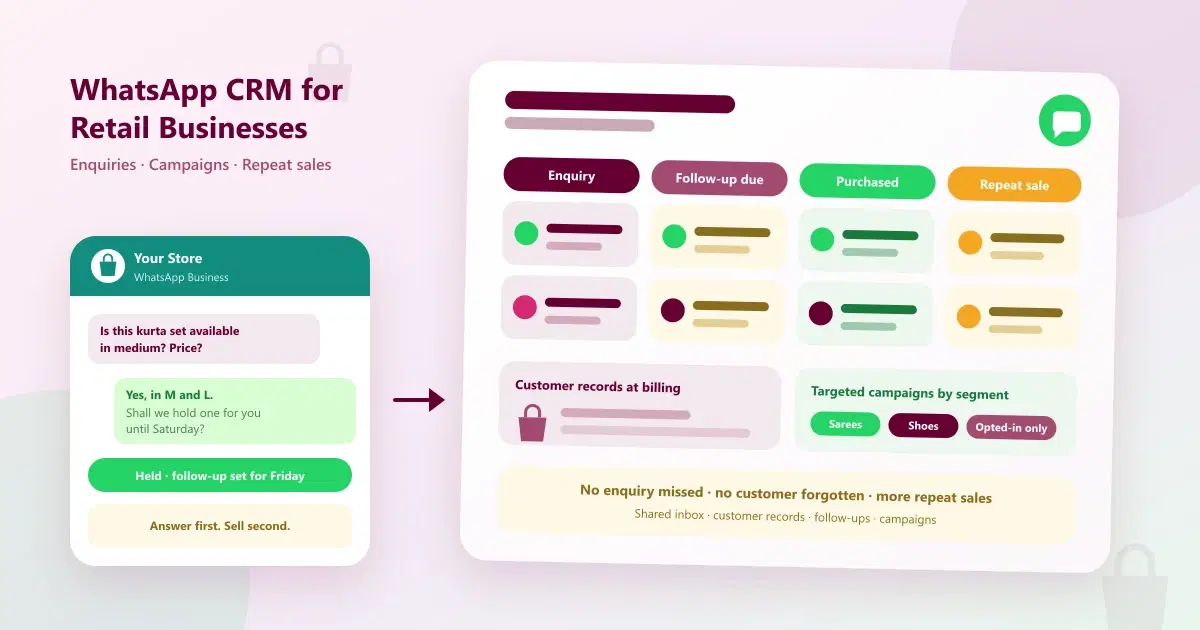
10 WhatsApp CRM strategies for retail businesses in India: handle product enquiries, follow up customers, run targeted campaigns and win repeat sales.
A customer sends a photo of a kurta set: "Is this available in medium? What's the price?" The shop assistant is billing another customer, so the message waits. When she finally replies two hours later, the customer has already messaged a competitor. In a store, that would be a walk-out. On WhatsApp, it happens silently, many times a day.
Retail runs on conversations: product questions, availability checks, "I'll think about it", and the next purchase months later. Most stores handle these on one phone, with no record of who asked for what. WhatsApp CRM for retail businesses brings those conversations, customer records, campaigns and follow-ups into one system. This guide gives ten practical strategies for retail businesses in India, with sample messages, a follow-up cadence, a campaign calendar and the numbers to track. It is written for store-based and local retail, which is different from the general overview in our WhatsApp CRM use cases guide.
Quick Answer: How Do Retailers Use WhatsApp CRM?
Retailers use WhatsApp CRM to handle product enquiries in a shared inbox, reply quickly on price and availability, record customers at billing, tag them by what they buy, follow up on undecided shoppers, send targeted opted-in campaigns, thank customers after purchase, and bring back repeat buyers, while tracking replies, sales and repeat rate.
What Is WhatsApp CRM for Retail Businesses?
WhatsApp CRM for retail stores is customer relationship software that connects your store's WhatsApp number to a shared team inbox, customer records with purchase history, tags, follow-up reminders, campaigns and reports. It also works as retail customer management software: instead of customers living in a notebook, a billing system and several phones, each customer has one record with what they bought, what they asked about, and what to do next. For the basics, see what WhatsApp CRM is.
Where Retail Stores Lose Sales on WhatsApp
| Retail problem | What it costs | Strategy that fixes it |
|---|---|---|
| Missed product enquiries | Customers buy elsewhere | Shared inbox and product enquiry capture (strategy 1) |
| Delayed replies on price and availability | Slow answers lose the sale | Fast, saved replies (strategy 2) |
| Forgotten follow-ups | "I'll think about it" never becomes a sale | Follow-up cadence (strategy 5) |
| Generic promotions | Irrelevant offers get ignored or blocked | Segments and targeted campaigns (strategies 4, 6 and 7) |
| Lost repeat customers | One-time buyers never return | Post-purchase and repeat-sale workflows (strategies 8 and 9) |
| Hard to manage customer conversations | Duplicate replies, dropped chats and no history | Shared inbox with customer records (strategies 1, 3 and 10) |
The Retail Customer Journey on WhatsApp
| Stage | Goal | What the store does | Metric |
|---|---|---|---|
| Enquiry | Reply fast and keep the customer | Shared inbox, saved replies, product details | First response time |
| Consideration | Help the customer decide | Share options, hold the item, follow up | Enquiry-to-purchase rate |
| Purchase | Close and record the sale | Bill, then capture the customer record | Customers captured at billing |
| After purchase | Build confidence and loyalty | Thank-you, feedback, care tips | Feedback response rate |
| Repeat | Bring them back | Targeted offers and reminders | Repeat purchase rate |
| Win-back | Recover lapsed customers | Gentle check-ins, then stop | Reactivation rate |
Top 10 WhatsApp CRM Strategies for Retail Businesses
1. Capture every product enquiry in one shared WhatsApp inbox
The problem: product enquiries arrive on staff phones, in Instagram DMs and on missed calls, and many are never answered.
The strategy: put the store's WhatsApp number on a shared team inbox with alerts, so any team member can reply and nobody depends on one phone. Add a "Chat with us" QR code at the billing counter, on shelf talkers, on the shop window and on bills, so more customers start the conversation on WhatsApp. See what a WhatsApp shared inbox is.
2. Answer price, availability and size questions in minutes
The problem: customers ask for price, stock, size or colour, and the shop floor is too busy to reply.
The strategy: set up saved replies for the questions you answer daily: store timings, location, delivery and return policy, and payment options. Keep a short habit for product queries: confirm availability, give the price, and offer to hold the item. Where your tool supports it, interactive flows can guide customers through choices. Always keep an easy way to reach a person. This is the core of WhatsApp marketing for retail businesses done right: answer first, sell second.
3. Record every customer at billing
The problem: after the sale, the store knows nothing about the customer, so it cannot follow up or personalise.
The strategy: at billing, capture the customer's name, mobile number and consent to receive WhatsApp messages, and note what they bought. Add preferences that help later, such as size, brand, budget, the occasion and birthday if shared. A one-minute habit at the counter builds the customer base every other strategy depends on.
4. Tag and segment customers by what they buy
The problem: every customer gets the same promotion, whatever they care about.
The strategy: tag customers by category (for example sarees, sports shoes, kitchen appliances), by spend level and by last purchase date. Import your existing customer list and apply tags in bulk. The next section shows the segments to start with. Better segments mean fewer messages and better results.
5. Follow up on "I'll think about it" customers
The problem: undecided shoppers leave and are never contacted, so a warm lead goes cold.
The strategy: when a customer says they will think about it, note the product and set a follow-up date. Follow up the same day with the details they asked for, a day or two later with something helpful, such as availability or a new arrival in the same category, and once more before an offer ends. Then stop. This is WhatsApp customer follow-up automation at its simplest: reminders so nothing depends on memory. See the cadence below.
6. Send targeted campaigns instead of generic promotions
The problem: blasting every contact with the same offer leads to blocks and ignored messages.
The strategy: send new arrivals to customers who bought in that category, clearance offers to price-sensitive customers, and early access to your best customers. Use approved templates and message only opted-in contacts. Replies come into the shared inbox, where the team continues the conversation. For campaign planning, see WhatsApp CRM strategies for festive sales.
7. Plan a seasonal and festive campaign calendar
The problem: big retail moments arrive, and the campaign is planned in a rush.
The strategy: plan the year around your peak moments, such as festive season, wedding season, end-of-season sales and new collections. Submit templates early, schedule campaigns in advance, and keep the team ready for the wave of replies. The calendar below gives a starting structure.
8. Thank customers and ask for feedback after the purchase
The problem: the relationship ends at the billing counter.
The strategy: send a short thank-you within a day or two, with the store's contact details and, where relevant, care or usage tips from your team. Ask for feedback or a review, and route any complaint to a person at once. Customers who feel looked after return.
9. Win repeat sales with reminders, occasions and loyalty
The problem: one-time buyers never come back, and nobody notices.
The strategy: use the customer record to send relevant reminders: replenishment for consumable products, seasonal needs, birthday and anniversary greetings, and early access for loyal customers. Reach out to customers who have not bought for a long time with a friendly check-in and a reason to return, and stop after a couple of attempts. For a worked example in jewellery, see jewelry store customer retention software.
10. Connect billing, conversations and results, then measure
The problem: conversations, billing and stock sit in separate places, so nobody can tell which messages produced sales.
The strategy: keep the customer record, billing and conversations connected, and track the numbers in the scorecard below every month: response time, enquiry-to-purchase rate, campaign replies and revenue, and repeat purchase rate. Our guide to WhatsApp marketing metrics explains the formulas.
How to Handle Different Retail Enquiries
| Enquiry type | Example | How to handle it |
|---|---|---|
| Price and availability | "Is this available in medium? What's the price?" | Confirm stock, share the price, offer to hold the item |
| Product options | "Do you have this in other colours?" | Share available options, with photos if you can |
| Store information | "What time do you close?" | Saved reply with timings and location |
| Delivery, exchange or return | "Can I exchange this?" | Share the policy clearly, and route exceptions to a manager |
| Bulk or corporate order | "I need 50 pieces for an event." | Capture details and hand over to a senior team member |
| Complaint | "The product has a defect." | Apologise, collect details and route to a person promptly |
A Follow-Up Cadence for "I'll Think About It" Customers
| When | Message | Goal |
|---|---|---|
| Same day | Send the product details, price and availability they asked for | Keep the conversation warm |
| 1 to 2 days later | A helpful nudge, such as a similar product or a photo | Move toward a decision |
| Before an offer ends | A short reminder with the end date | Create gentle urgency |
| When the item is back in stock or on offer | A direct message to the customer who asked | Convert a ready buyer |
| After that | Stop, and add to a later list | Respect the customer |
Retail Customer Segments and What to Send Each
| Segment | Example definition | What to send | Goal |
|---|---|---|---|
| New customers | First purchase in the last month | Thank-you and a gentle invitation back | Earn a second purchase |
| Category buyers | Bought in a specific category | New arrivals in that category | Increase relevance and sales |
| High-value customers | Top spenders or frequent buyers | Early access and thank-you | Reward and retain |
| Lapsed customers | No purchase for a long time | Friendly check-in with a reason to return | Reactivate |
| Open enquiries | Asked about a product, did not buy | Follow-up on that product | Convert warm leads |
A Retail WhatsApp Campaign Calendar
| Moment | Audience | Goal |
|---|---|---|
| Festive season | Past buyers by category, plus open enquiries | Gifting and festive purchases |
| Wedding season | Customers who bought related categories | Event-led purchases |
| New collection or arrival | Category buyers and best customers | Early interest and visits |
| End-of-season sale | Lapsed customers and price-sensitive buyers | Clear stock and win back customers |
| Birthdays and anniversaries | Customers who shared the date | Personal touch and a small offer |
| Quiet periods | Loyal customers | Keep the relationship warm |
Strategies by Type of Retail Store
| Store type | Most useful strategies | Why |
|---|---|---|
| Fashion and apparel | 2, 4, 6, 7 | Visual enquiries, seasons and new arrivals |
| Jewellery | 3, 5, 7, 9 | High-value decisions, occasions and loyalty |
| Electronics and appliances | 2, 5, 8, 10 | Comparison shopping and after-sales trust |
| Home and furniture | 2, 5, 7 | Long consideration and festive peaks |
| Footwear and accessories | 2, 4, 6, 9 | Size and style enquiries, repeat buyers |
| Gifts and lifestyle | 6, 7, 9 | Occasion-led buying |
WhatsApp Message Templates for Retail
Keep messages short, friendly and easy to answer. Replace the details in brackets, and send only to opted-in contacts. These are examples to adapt.
- Enquiry reply: "Hi [Name], thanks for asking about [product]. It's available in [sizes or colours] at [price]. Shall we hold one for you?"
- Follow-up: "Hi [Name], you asked about [product] earlier. It's still available. Would you like us to keep it aside until [day]?"
- Thank-you: "Thank you for shopping at [Store], [Name]! We hope you love your [product]. Reply here if you need anything."
- Back in stock: "Good news, [Name]! The [product] you asked about is back in stock. Reply YES and we'll reserve it."
- New arrivals: "Hi [Name], our new [category] collection is in. Reply YES for a preview."
- Win-back: "Hi [Name], it's been a while! We'd love to see you at [Store]. Here's something for your next visit: [offer]."
Keeping Your Store's WhatsApp Number
Most stores already have a WhatsApp Business number that customers know and save. WhatsApp Business API for retail does not have to mean a new number. WhatsApp Coexistence lets eligible businesses keep their number and keep using the WhatsApp Business app while the same number is connected to a CRM platform.
It is worth knowing what changes. According to Meta's documentation, broadcast lists are disabled in the Business app once the number is connected, and campaigns are sent through the platform instead. Eligibility depends on your number, app version and provider. We explain this in WhatsApp CRM for small businesses in India.
Retail WhatsApp Scorecard
| Metric | How to calculate | What it shows |
|---|---|---|
| First response time | Time from enquiry to first reply | Whether you answer before customers look elsewhere |
| Enquiry-to-purchase rate | Purchases divided by product enquiries | How well conversations turn into sales |
| Customers captured at billing | Billed customers with a saved record divided by all billed customers | How fast your customer base is growing |
| Campaign reply rate | Replies divided by messages delivered | Whether offers are relevant |
| Revenue per campaign | Sales attributed to each campaign | Which offers earn the most |
| Repeat purchase rate | Customers who buy again divided by all customers in the period | Whether loyalty is improving |
WhatsApp Rules Retailers Must Follow
- Get opt-in. Message customers who have agreed to hear from you, and make it easy to opt out.
- Use approved templates. Business-initiated messages outside the 24-hour customer service window generally need an approved template.
- Do not over-message. Too many promotions lead to blocks and lower quality ratings.
- Know the costs. Meta charges for template messages separately from your software subscription, and rates can change.
- Use official access. Connect through the WhatsApp Business Platform or a provider built on it, not unofficial bulk senders that put your number at risk.
Common Mistakes to Avoid
- Answering the price and nothing else. Offer to hold the item or suggest an alternative.
- Not recording customers at billing. You cannot follow up with someone you do not know.
- Sending the same promotion to everyone. Use segments.
- Importing contacts who never opted in. It risks blocks and a poor quality rating.
- Forgetting the "I'll think about it" customers. They are your warmest leads.
- Relying on one phone. Use a shared inbox.
- Not measuring. Track response time, enquiry-to-purchase and repeat rate.
How Cleomitra Supports Retail Businesses
Cleomitra is a WhatsApp-led retail CRM software in India that combines the shared inbox, customer records, campaigns and follow-ups, with billing and inventory for retail stores. Based on what the product and the Cleomitra Retail CRM page describe:
- Shared inbox: all customer messages are captured in one team inbox, with instant alerts, customer history, tags, templates and internal notes. See the WhatsApp platform page.
- Customer records: bulk contact import, tags by interest or behaviour, and complete customer profiles with history, notes and conversations. See the Contacts and Follow-ups page.
- Targeted campaigns: WhatsApp campaigns to specific customer groups using approved templates, subject to WhatsApp and Meta policies and messaging limits. See the Campaigns page.
- Follow-up automation: follow-up reminders and automated follow-ups, so undecided customers are not forgotten.
- In-chat selling: the WhatsApp platform page describes flows for booking and selling products with in-chat catalogs and checkout.
- Billing and inventory: the retail CRM page describes inventory management, billing and WhatsApp promotions to grow repeat sales.
- Coexistence: for eligible businesses, keep your existing number and contacts. See the WhatsApp Coexistence page. Broadcast lists move to the platform, as explained above.
Plan details, based on the current Cleomitra pricing:
- Engage Starter (₹999/month) includes a basic shared inbox, manual campaigns and one ready-made Autopilot flow, but no CRM.
- Engage Growth (₹1,499/month) adds the CRM with the shared inbox, an unlimited flow builder, scheduled and recurring campaigns, and reports and insights.
- Engage Pro (₹2,499/month) adds unlimited pipelines and flows, and includes Instagram and email.
- Service OS Growth (₹2,799/month) and Service OS Pro (₹3,999/month) add appointments and booking, POS with GST invoices, services and products, and inventory.
- Each plan includes one branch, and an extra branch is an add-on at ₹999/month.
Meta's WhatsApp message charges are separate from the subscription. Cleomitra suits store-based and local retail where relationships and repeat sales matter. If you run a very large online catalogue or multi-warehouse operation, compare specialised commerce tools as well. Check the pricing page for exactly what each plan includes.
Related Guides
- Top 10 WhatsApp CRM Use Cases for Businesses in India (2026)
- WhatsApp CRM for Small Businesses in India (2026): Keep Your Number, Scale Campaigns
- Top 10 WhatsApp CRM Strategies for Festive Sales in India (2026)
- How to Keep Buyers Coming Back: The Best Jewelry Store Customer Retention Software
- How to Sell Products on WhatsApp in 2026 with AI: Complete eCommerce Automation Guide
- Top 10 Features to Look for in WhatsApp Marketing Software in India (2026)
Ready to Turn Store Enquiries Into Repeat Sales?
See how Cleomitra can handle product enquiries, follow-ups and campaigns for your retail business, on the WhatsApp number your customers already know.
Explore Cleomitra Retail CRM or talk to Cleomitra about WhatsApp CRM for your store.
Frequently Asked Questions
What is WhatsApp CRM for retail businesses?
WhatsApp CRM for retail businesses is software that connects a store's WhatsApp number to a shared inbox, customer records with purchase history and tags, follow-up reminders, targeted campaigns and reports. It helps stores answer product enquiries fast, follow up on undecided shoppers, and bring customers back for repeat sales.
How can a retail store manage product enquiries on WhatsApp?
Move enquiries into a shared inbox so any team member can reply, and keep saved replies for store timings, delivery, returns and payment options. For product questions, confirm availability, share the price and offer to hold the item. Record the customer and the product asked about, and set a follow-up date.
How do retailers follow up with customers who did not buy?
Note the product and set a follow-up date when a customer says they will think about it. Follow up the same day with the details, a day or two later with a helpful nudge, and once more before an offer ends. When the item returns to stock, message the customer who asked. Then stop.
How can a retail business do WhatsApp marketing without spamming customers?
Message only customers who have opted in, and segment them by what they buy and when. Send new arrivals to category buyers and clearance offers to price-sensitive customers, using approved templates. Keep the frequency sensible, make opting out easy, and route replies to a person who can continue the conversation.
Can a retail store use the WhatsApp Business API with its existing number?
Often yes. WhatsApp Coexistence lets eligible businesses keep their number and the WhatsApp Business app while connecting to a CRM. Eligibility depends on Meta's rules and your provider, and some app features change, such as broadcast lists moving to the platform. Confirm the details with your provider first.
How do retail businesses get repeat customers with WhatsApp?
Record every customer at billing, tag them by what they buy, and send relevant messages: a thank-you after purchase, new arrivals in their category, replenishment or seasonal reminders, birthday greetings and early access for loyal customers. Check in with lapsed customers gently, and stop after a couple of attempts.
What should a retail business track in its WhatsApp CRM?
Track first response time, enquiry-to-purchase rate, the share of billed customers captured, campaign reply rate, revenue per campaign and repeat purchase rate. These show whether enquiries become sales and whether customers return. Review them monthly, and keep the campaigns and follow-ups that actually produce sales.
How much does retail CRM software cost in India?
There are two parts: the software subscription, usually priced in rupees per month, and Meta's WhatsApp message charges, which are separate and can change. At Cleomitra, plans start at ₹999 per month, the CRM with the shared inbox starts at ₹1,499, and plans with POS, GST invoices and inventory start at ₹2,799.
